
Omarchy Notion Capture
An Omarchy Quickshell bar widget and agent-friendly CLI for quickly creating pages in a dedicated Omarchy database in Notion.
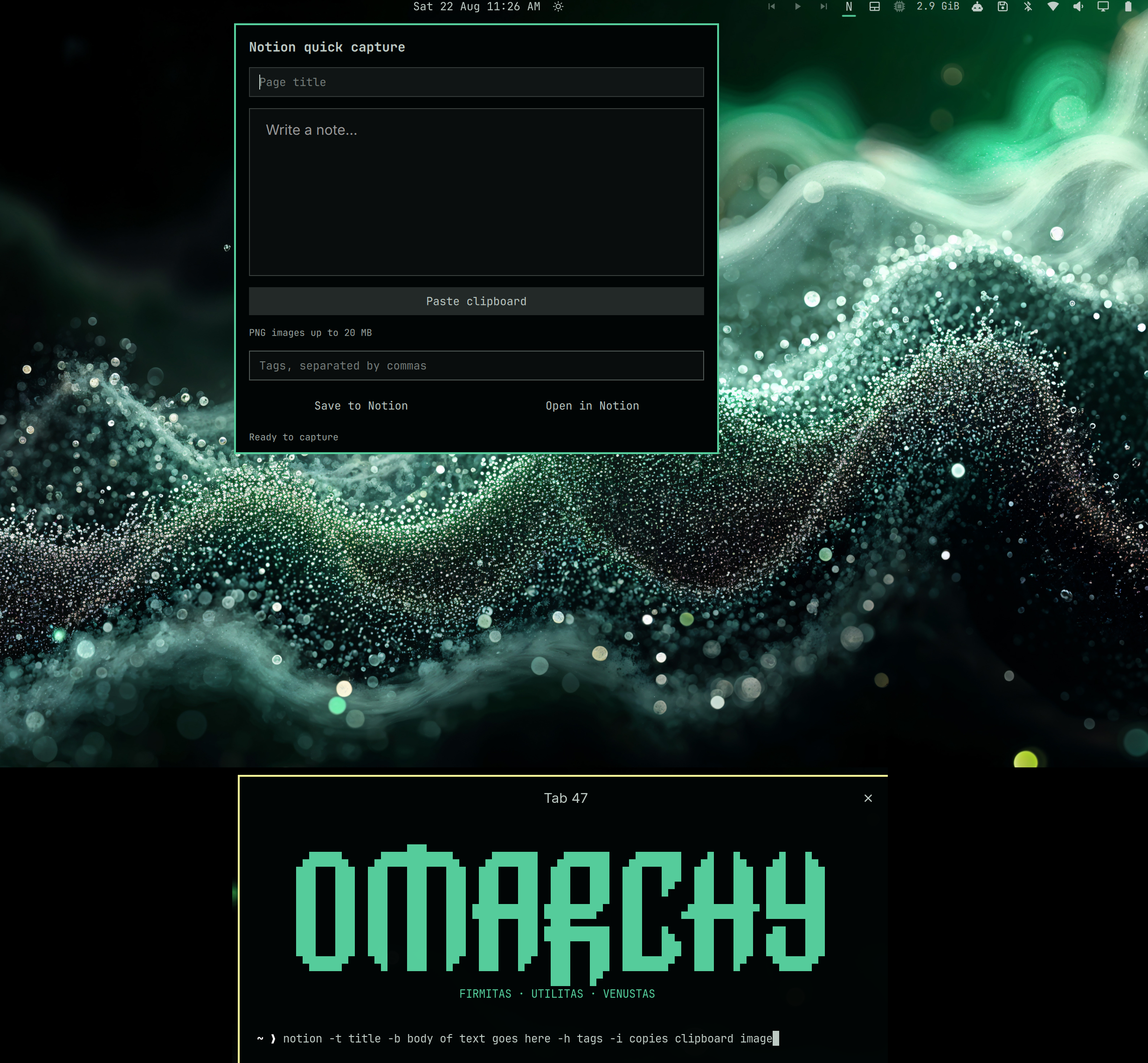
The widget captures a title, Markdown note body, tags, and an optional PNG from the clipboard. The CLI offers the same workflow for terminal users, scripts, and LLM agents.
Requirements
- Omarchy with the plugin-capable shell
- A free or paid Notion workspace
- A Notion connection with Insert content capability
curl,jq,secret-tool, andwl-paste(installed automatically)
Install
omarchy plugin add https://github.com/mpweaver/omarchy-notion --enable --yes
omarchy bar move user.omarchy-notion --section right
This installs and enables the widget and places it on the right side of the Omarchy bar.
Enable the terminal CLI
Omarchy intentionally does not run plugin install hooks. Run the included setup once to install the required packages and create the notion and omarchy-notion command links:
bash ~/.config/omarchy/plugins/user.omarchy-notion/install.sh
First-run setup
- Open Notion connections and create a connection.
- Give it Insert content capability and copy its installation access token.
- In Notion, create or choose a normal parent page. Open that page's menu, choose Connections, and add the new connection.
- Enable the terminal CLI as shown above, then run
notion setup. - Paste the token at the hidden prompt, then paste the shared parent page URL.
The setup wizard stores the token in the desktop keyring—not in this repository or a plain-text configuration file. It creates a database named Omarchy with Name, Tags, Source, and Created properties.
Verify setup:
notion status
notion -t "Test capture" -b "The Notion plugin is working." -h test
Widget
Click the capital N in the Omarchy bar to open quick capture. Enter a title, note body, and optional comma-separated tags. Paste clipboard accepts text or a PNG up to 20 MB. Attached images have a preview and a Remove attachment button. Pasting text replaces any image attachment. Discard draft or closing the popup clears the draft; a save already in progress is allowed to finish. Paste and Save cannot run simultaneously. Open in Notion opens the generated Omarchy database.
CLI reference
Quick capture flags
-t, --title TITLE       Page title (required)
-b, --body TEXT         Markdown body; use - to read the body from stdin
-h, --tags TAGS         Comma-separated tags or hashtags
-s, --source SOURCE     Source label: Widget, CLI, Agent, or a custom value
-i, --image             Attach the PNG currently stored in the clipboard
--json                   Read a JSON capture object from stdin
Quotes are recommended for multi-word values:
notion -t "Quick thought" -b "Remember this tomorrow" -h "idea,personal"
notion -t "Screenshot" -b "Captured issue" -h bug -i
printf '%s\n' "A longer note from stdin" | notion -t "Terminal note" -b - -h terminal
Commands
notion setup             Create the Omarchy database and save credentials securely
notion status            Print JSON showing configuration and token status
notion capture [flags]   Create a database page
notion capture --json    Read an agent-friendly JSON object from stdin
notion clipboard-read    Return clipboard text or a cached PNG description as JSON
notion open              Open the Omarchy database in Notion
notion help              Show terminal usage
Agent JSON example:
printf '%s' '{"title":"Research task","body":"Investigate this topic","tags":["agent"],"source":"Agent"}' \
  | notion capture --json
An agent may provide an existing PNG using image_path; the file must be PNG and at most 20 MB. It is not deleted after upload unless the JSON explicitly includes "delete_image": true. Images are copied with a hard byte limit into a private staging file and validated before any page is created; only that snapshot is uploaded.
Update
omarchy plugin update user.omarchy-notion --yes
bash ~/.config/omarchy/plugins/user.omarchy-notion/install.sh
Remove
bash ~/.config/omarchy/plugins/user.omarchy-notion/uninstall.sh
Removal clears generated clipboard attachments but preserves the Notion database, desktop-keyring token, and ~/.config/omarchy-notion settings.
Agent installation
See AGENT-INSTALL.md for explicit setup, security boundaries, verification, and automated capture instructions.
Privacy and security
- No token, database ID, page ID, email address, or local home path is included in the repository.
- The installation access token is stored with
secret-toolin the user's desktop keyring. - The local configuration contains only generated Notion object IDs and the database URL and is created with user-only permissions.
- Network and clipboard reads have time and byte limits; helper errors are bounded and rendered as plain text.
- The Notion bearer token and note body are passed to
curlthrough private file descriptors, not process arguments. Note fields are also kept out ofjqarguments using private files, removed on completion/failure. - Use
capture --jsonor--body -with stdin for sensitive content. Text you explicitly put in CLI arguments may appear in process lists or shell history. - Uploads use a fixed multipart filename and a bounded, validated snapshot, including when the original path is a symlink or contains commas, quotes, or semicolons.
- Clipboard drafts use a private runtime directory when available, with a private cache fallback. Files older than one hour are pruned on helper status/read and every minute while the widget runs; at most ten recent files per cache are retained. The old persistent cache is pruned too. Removal/discard queues cleanup immediately; logout also clears the runtime directory.
- User curl configuration is disabled so it cannot unexpectedly enable request tracing or alter these requests.
- Setup writes configuration through a private temporary file and atomically replaces the destination without writing through a file symlink.
- API responses are streamed through a hard 2 MiB cap before they are read into shell memory; curl's declared-size check is retained as an early rejection only.
- Database links are opened only when they use HTTPS on a Notion origin.
- Review third-party Omarchy plugins before enabling them; plugins run as unsandboxed code in
omarchy-shell.
Tests
bash tests/security.sh
python -m unittest discover -s tests -p 'test_*.py' -v
node tests/widget-state.js
The Python regressions use real curl against a localhost-only fake API, fake credentials and a synthetic clipboard in temporary directories. They never connect to Notion or access the desktop keyring. Node checks the widget's actual JavaScript state transitions with test UI/process objects. Test-only requirements are Python 3 and Node.js; they are not runtime dependencies.
License
MIT