
A lightweight, keyboard-first Quickshell bar widget for Omarchy that fronts yt-dlp. Paste a URL, press Enter, pick a mode, press Enter again to download.
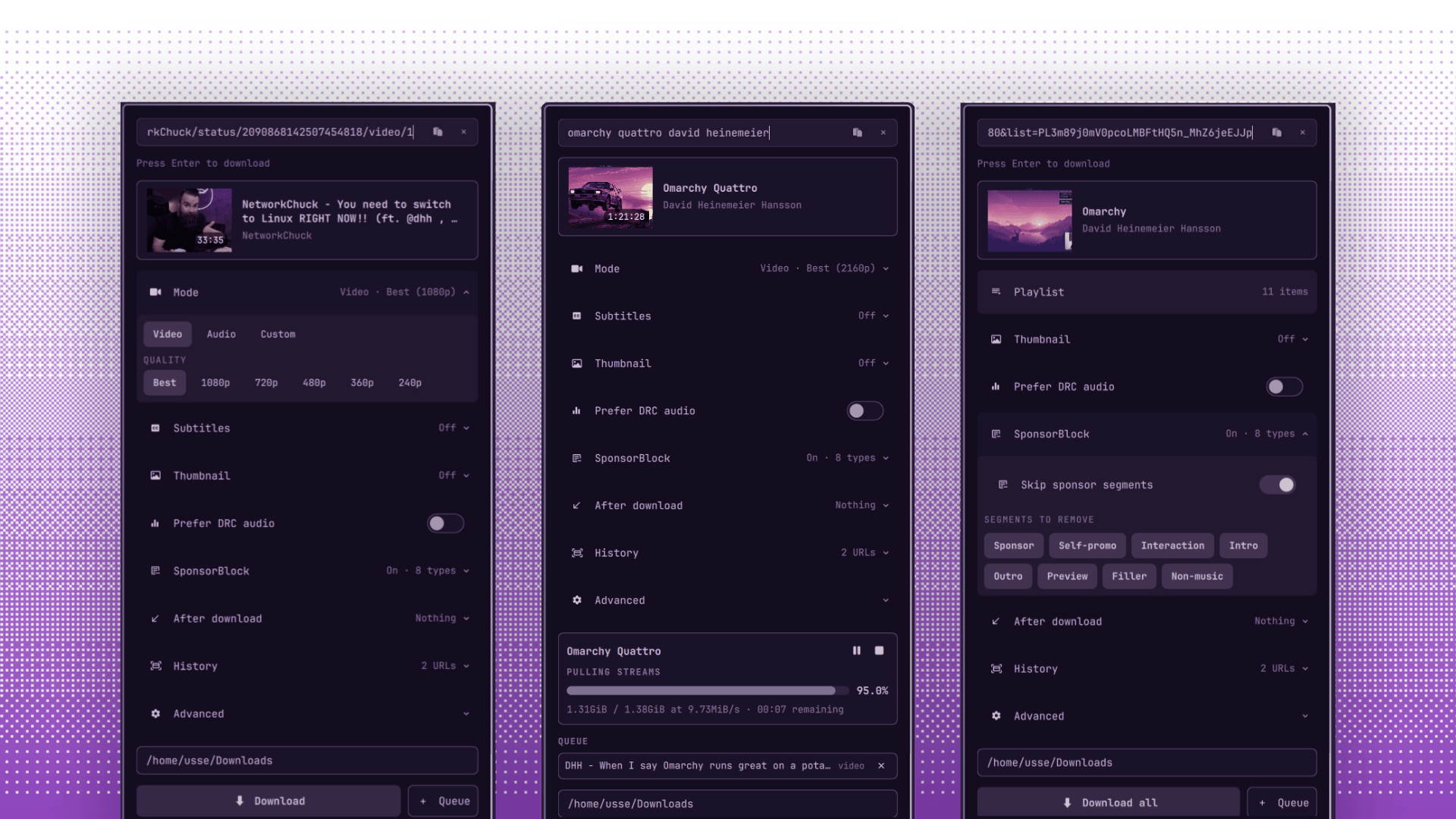
Features
- Works with any site
yt-dlpsupports. - Paste a bare domain, prose, or a URL with trailing punctuation. Otoru adds
https://, strips the junk, and a hint under the field says what Enter will do. - Search YouTube by typing a plain query. No URL needed; the first result is extracted.
- Auto-pastes the clipboard URL on open (toggleable), extracts right after pasting (also toggleable), and skips URLs you already downloaded this session. A paste button in the field re-reads the clipboard anytime.
- Clears the input after a successful download (toggleable), ready for the next URL.
- Download modes: best quality, video, audio, and custom.
- Video qualities shown only when the source offers them: Best, 2160p, 1440p, 1080p, 720p, 480p, 360p, 240p.
- Audio formats: best, MP3, Opus, M4A, plus audio track selection by language.
- Thumbnails: save as JPG next to the download, embed into the file metadata, or both.
- Subtitles: embed into the video, include auto-generated captions, pick a language.
- Prefer DRC audio (YouTube "Stable Volume") for more consistent loudness.
- Skip sponsor segments via SponsorBlock, per category (sponsor, self-promo, interaction, intro, outro, preview, filler, non-music).
- Download archive: skip media you already downloaded (optional).
- Pause and resume downloads; partial downloads continue where they left off.
- Download history with a save toggle, clear button, and tap-to-redownload.
- Playlists: paste a URL, see the item count, download everything in one go.
- Post-download actions: nothing, copy the path, open the folder, or open the file.
- Configurable download directory and advanced
yt-dlpoptions. - Queue: add URLs, drop items, downloads run in sequence.
- Live progress bar with percent, size, speed, and ETA.
- Desktop notifications on completion or failure.
- Friendly errors from
yt-dlpoutput, a raw-log viewer, and "Retry as web client" for blocked sources. - Bar icon pulses while extracting or downloading.
Requirements
- None.
yt-dlpships with Omarchy.
Install
From the Omarchy plugin marketplace, or directly:
omarchy plugin add https://github.com/ussego/otoru.git --enable
Marketplace installs are snapshot-verified against the exact commit the marketplace reviewed. The direct command installs the current default branch, which is not verification-bound.
Uninstall
omarchy plugin remove ussego.otoru
Uninstall removes the plugin. Your downloads and settings file stay. To delete your settings too:
rm ~/.config/omarchy/ussego.otoru.json
Mouse actions
- Left click opens the panel.
- Right click opens it too.
Keyboard shortcuts
Inside the panel:
enter: extract the current URL or start the selected download.tab/shift+tab: switch to the neighboring panel.escape: close the panel.ctrl+backspace: clear the input and media card, keep typing.ctrl+1/ctrl+2/ctrl+3: switch mode (video / audio / custom) while typing.ctrl+r: retry a failed extraction/download as a web client.ctrl+p: pause / resume the download.
Workflow
- Click the download icon in the bar to open otoru.
- If enabled, otoru auto-pastes the clipboard URL and extracts it.
- Press
Enterto extract, or type a plain query to search YouTube. - Pick a mode and quality or format. For a playlist, otoru shows the item count and offers "Download all".
- Press
Enteragain to start. Long downloads can be paused and resumed from the panel. - Press
Escapeto close the panel.
After a successful download the input clears (toggleable) so the next URL is one paste away. Failed downloads keep your URL in place for a quick retry.
Settings
Settings live in ~/.config/omarchy/ussego.otoru.json, outside the plugin folder, so saving them does not reload the widget.
Example:
{
  "downloadDir": "/home/usse/Downloads",
  "autoClipboard": true,
  "autoExtractClipboard": true,
  "clearInputAfterDownload": true,
  "audioFormat": "best",
  "advancedVisible": false,
  "outputTemplate": "%(title)s.%(ext)s",
  "cookies": "",
  "cookiesFromBrowser": "brave",
  "cookiesProfile": "Default",
  "proxy": "",
  "rateLimit": "",
  "concurrentFragments": "",
  "customFormatSelector": "",
  "customArgs": "",
  "downloadThumbnail": false,
  "embedThumbnail": false,
  "embedSubs": false,
  "includeAutoSubs": false,
  "preferDrc": false,
  "sponsorBlock": false,
  "sponsorBlockCategories": ["sponsor", "selfpromo", "interaction"],
  "subLanguage": "all",
  "useArchive": false,
  "saveHistory": true,
  "history": [],
  "postDownloadAction": "nothing"
}
History
- With "Save download history" on, downloaded URLs are remembered across sessions (capped at 50) and shown under "History" for one-tap re-downloads. Turning it off clears the stored list.
- History also stops the clipboard auto-paste from re-suggesting URLs you already downloaded this session.
Download archive
With "Skip already-downloaded media" enabled, otoru passes --download-archive to yt-dlp, which records media IDs in .otoru-archive.txt inside your download directory. Anything already recorded is skipped instantly, including items inside playlists.
Cookies
- Cookies file path: a Netscape-format cookies text file.
- Cookies from browser: live cookies from a supported browser (Brave, Chrome, Chromium, Edge, Firefox, Opera, Safari, Vivaldi, Whale).
- Browser profile: optional profile name or full browser config path, e.g.
Default,Profile 1, or/home/usse/.config/BraveSoftware/Brave-Origin.
A selected browser takes precedence over the cookies file. Browser cookies apply to both extraction and download.
IPC
The widget exposes omarchy-shell IPC targets under ussego.otoru:
omarchy-shell ussego.otoru open
omarchy-shell ussego.otoru close
omarchy-shell ussego.otoru show
omarchy-shell ussego.otoru hide
omarchy-shell ussego.otoru toggle
omarchy-shell ussego.otoru extract <url>
omarchy-shell ussego.otoru download
omarchy-shell ussego.otoru cancel
omarchy-shell ussego.otoru retry
omarchy-shell ussego.otoru clear
omarchy-shell ussego.otoru refresh
omarchy-shell ussego.otoru status
omarchy-shell ussego.otoru progress
Keybinding
Add to ~/.config/hypr/bindings.lua:
hl.unbind("SUPER + SHIFT + O")
o.bind("SUPER + SHIFT + O", "Toggle otoru", "omarchy-shell ussego.otoru toggle")
License
MIT, see LICENSE.