
Omahub
← All plugins
U

WARP

by usse

Cloudflare WARP connection manager: status, virtual IP, mode, account, and one-click connect/disconnect in the Omarchy bar.

Security review

Review recommended · 3 findings

Deterministic scan — not a security guarantee

Medium
Risk level
Medium
Analyzed commit
5d14b91
Scanned
1 month ago
  • medium external_hosts Service.qml:253

    Downloads or connects to an external HTTP(S) host.

    curl", "-sS", "--max-time", "5", "https://www.cloudflare.com/cdn-cgi/trace"]
  • Docs persistence README.md:40

    Registers scheduled or boot-time system tasks.

    systemctl enable --now warp-svc`
  • Docs sudo README.md:40

    Command runs with sudo, elevating the process beyond the plugin environment.

    sudo systemctl enable --now warp-svc`

Automated analysis only — not a security guarantee.

AI advisory review

No obvious issues detected

Language-model assessment · ~deepseek/deepseek-v4-flash-latest — advisory only

Low
AI risk level
Low
Recommendation
install
Model
~deepseek/deepseek-v4-flash-latest
Analyzed commit
5d14b91
Reviewed
1 month ago

The plugin is a QML widget that manages Cloudflare WARP via warp-cli, with no persistence, no system modifications, and no destructive commands. The only external network call is to Cloudflare's trace endpoint for egress verification, which is expected. The deterministic scan flags are from README documentation (sudo systemctl enable) and the curl call, both benign.

  • The plugin runs warp-cli with --accept-tos, which is standard for the WARP CLI.
  • The curl call to cloudflare.com/cdn-cgi/trace is for checking egress IP, not suspicious.
How this check works

This review combines the deterministic scan (the rule-based results above) with an independent look at the plugin's code by a language model. The model reads a trimmed sample of the repository's files, the manifest, and the README, then gives a plain-language risk level and a recommendation: install (no notable danger), review (look closer first), or avoid (clearly dangerous).

It runs on the same analyzed commit as the deterministic scan and is strictly advisory — it is not a security guarantee and never blocks a plugin by itself. A human moderator still reviews plugins before they are listed.

AI advisory only — automated analysis, not a security guarantee.

Install
$ omarchy plugin add https://github.com/ussego/owarp --enable
System #bar #system #security

owarp

A native Omarchy bar widget that manages Cloudflare WARP through warp-cli.
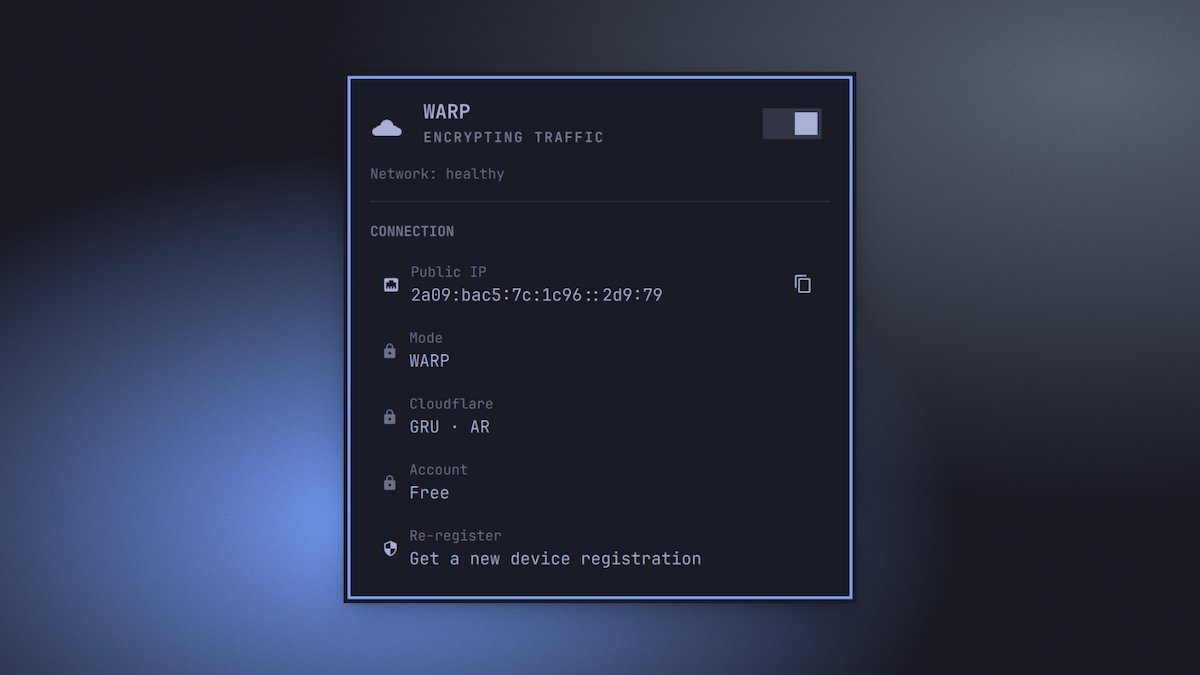
owarp control panel

Features

  • Cloudflare cloud mark in the bar, theme-colored:
    • solid while connected
    • dim + struck while disconnected
    • pulsing while connecting
    • "!" badge when the WARP daemon is unreachable
  • Left click opens a keyboard-friendly panel
  • Right click toggles WARP on/off
  • Middle click refreshes status
  • Panel shows your public (egress) IP (one click to copy), mode, gateway, endpoint, proxy port, Cloudflare point of presence, and account plan / license
  • Verifies WARP is actually routing: fetches https://www.cloudflare.com/cdn-cgi/trace and warns if the daemon says Connected but traffic isn't going through WARP
  • Re-register the device (or a first registration) with a two-step confirm, and an automatic prompt when the daemon reports registration is missing
  • Optimistic connect/disconnect — the switch throws the instant you click
  • Rotating status phrases while connected, connecting pulse while it settles

Keyboard shortcuts

Inside the panel:

  • j / k or arrows: move cursor
  • enter / space: activate (toggle, copy IP, re-register)
  • t: toggle WARP
  • c: copy public IP
  • r: refresh status
  • esc: close

Requirements

  • warp-cli on PATH (Cloudflare WARP client for Linux)
  • the WARP daemon running: sudo systemctl enable --now warp-svc
  • curl for the Cloudflare trace check
  • wl-copy for the copy action

Install

From the Omarchy plugin marketplace, or directly:

omarchy plugin add https://github.com/ussego/owarp --enable

Tune the poll rate and the trace check in ~/.config/omarchy/shell.json under the ussego.owarp entry:

{ "id": "ussego.owarp", "refreshIntervalSec": 15 }

Uninstall

omarchy plugin remove ussego.owarp

The plugin is self-contained in its plugin folder — no systemd units, no config files, no background services are created or left behind.

IPC

The widget exposes omarchy-shell IPC targets under ussego.owarp:

omarchy-shell ussego.owarp toggle
omarchy-shell ussego.owarp connect
omarchy-shell ussego.owarp disconnect
omarchy-shell ussego.owarp refresh
omarchy-shell ussego.owarp copyIp
omarchy-shell ussego.owarp reRegister
omarchy-shell ussego.owarp status

License

MIT — see LICENSE.