
hyprland-alttab
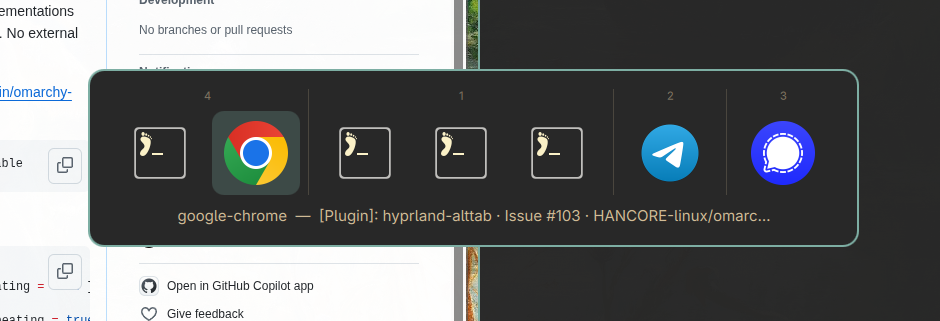
A visual Alt+Tab window switcher for the Hyprland Wayland compositor.
The recommended implementation is an Omarchy shell plugin (QML,
hosted by the omarchy-shell Quickshell process). Two legacy standalone implementations —
a Rust GTK4 binary and a Python prototype — are kept in the repo.
omarchy-plugin/   Omarchy shell plugin (QML) — recommended
rust/             Legacy standalone GTK4 binary
python/           Legacy prototype
Features
- 🪟 Visual switcher on the layer-shell
Overlaylayer with exclusive keyboard focus - 🗂️ Grouped by workspace (active first), sorted by recency (
focusHistoryID), pinned windows excluded - 🖼️ App icons resolved from
.desktopfiles (id variants,StartupWMClass, title match for Chrome PWAs) - 🎨 Theme-aware — follows the active Omarchy theme automatically
- ⌨️ Tab/Right → next, Shift+Tab/Left → previous, Return → activate, Escape → cancel, releasing ALT/SUPER → activate; hover selects, click activates
- 🫀 Stays open while ALT or SUPER is physically held (verified via
hl.is_key_downwhen no keyboard event reaches the overlay)
Install (Omarchy plugin)
omarchy plugin add https://github.com/c4software/hyprland-alttab --enable
For local development, symlink a checkout instead and enable it:
ln -sfn "$PWD/hyprland-alttab" ~/.config/omarchy/plugins/vbrosseau.alttab
omarchy plugin enable vbrosseau.alttab
Then bind it — in ~/.config/hypr/bindings.lua (or customisation.lua):
hl.unbind("ALT + TAB")
o.bind("ALT + TAB", nil, hl.dsp.global("omarchy-alttab:next"), { repeating = true })
hl.unbind("SUPER + TAB")
o.bind("SUPER + TAB", nil, hl.dsp.global("omarchy-alttab:next"), { repeating = true })
hl.layer_rule({ match = { namespace = "omarchy-alttab" }, no_anim = true })
Finally omarchy restart shell, then hyprctl reload and check hyprctl configerrors.
The shortcut must appear in hyprctl globalshortcuts. Manual trigger for testing:
hyprctl dispatch 'hl.dsp.global("omarchy-alttab:next")'
See omarchy-plugin/README.md for details.
Uninstall
omarchy plugin remove vbrosseau.alttab --yes
Then remove the two binds and the layer rule from your Hyprland config and hyprctl reload.
The plugin never modifies your configuration files itself.
Why a shell plugin?
The QML plugin runs as a service inside the long-lived omarchy-shell process:
| Legacy (Rust/Python) | Plugin (QML) |
|---|---|
| Daemon + Unix socket + PID files | The resident shell process |
| One-shot GTK switcher process | LazyLoader → PanelWindow in-process |
--focus-address helper process |
Hyprland.dispatch() after close |
| Spawn guard against double-launch | An open boolean |
| Parses theme files itself | Shell Color singleton (live theme) |
| Needs an autostart entry | Loaded by the shell every session |
Legacy implementations
Both are standalone programs that predate the plugin, driven by a daemon and their own Unix sockets. They are not installed, invoked or required by the plugin.
alttab                      Starts the daemon if needed, sends "tab" (bind this)
alttab --daemon             Starts the daemon in the background
alttab --show               Shows the GTK4 switcher (one-shot)
alttab --kill               Stops the daemon
alttab --focus-address ADDR Focus a window by Hyprland address
Build instructions, architecture and runtime details: rust/README.md.