
OpenCloud for Omarchy
An Omarchy bar plugin for the official OpenCloud Desktop client. It monitors all configured accounts and sync spaces, so it is not tied to a particular OpenCloud server.
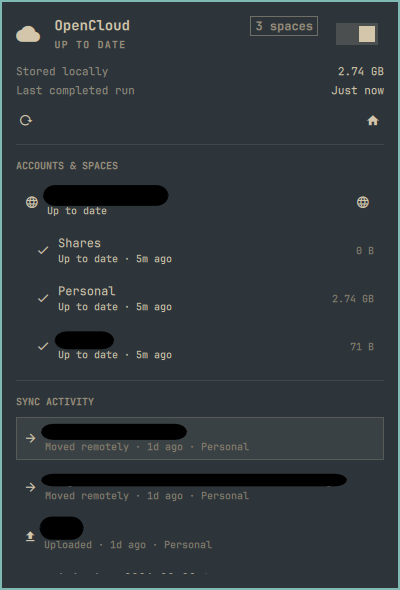
Features
- Live per-space sync state from the OpenCloud Desktop local socket
- Actual upload, download, move, delete, conflict, and error activity from the desktop client's local sync logs
- Last completed sync run in the bar tooltip and panel
- Local disk usage for every configured sync space
- Honest whole-client start and quit control
- Quick links to the OpenCloud client, account servers, local spaces, and synchronized files
- A visible refresh animation and a brief confirmation after manual refresh
- Mouse, keyboard, and Omarchy shell IPC controls
- Multiple accounts and multiple spaces without server-specific configuration
The plugin deliberately does not report server quota: OpenCloud Desktop does not expose it through its local status interface. The displayed storage value is disk space used by synchronized files on this computer.
Requirements
-
Omarchy with shell plugin support
-
Python 3 (included with Omarchy)
-
The official OpenCloud Desktop client:
omarchy pkg add opencloud-desktop
OpenCloud must have at least one account configured before account and space details can appear. Use any server URL supported by OpenCloud Desktop.
Install
From GitHub:
omarchy plugin add https://github.com/victoralensai/omarchy-opencloud.git --enable --yes
For local development, run this from the repository checkout:
omarchy plugin add "$PWD" --enable --yes
Open the official client to add or reconnect an account:
uwsm-app -- opencloud --showsettings
If the native OpenCloud tray icon duplicates this plugin, open Omarchy's Manage tray panel and hide the OpenCloud item. This is an optional personal tray preference; the plugin never changes it for you.
Controls
- Left-click the bar icon to open or close the panel.
- Right-click it to perform a detailed refresh.
- Middle-click it to show OpenCloud Desktop.
- In the panel, use arrows or
j/kto move and Enter to activate. - Press
Rto refresh,Oto show the desktop client,Cto start or quit it, and Escape to close the panel.
The header switch starts or quits the complete OpenCloud Desktop client. It does not pretend to pause individual accounts or spaces because the desktop client does not provide a reliable supported command for that operation.
IPC examples:
omarchy shell victor.opencloud status
omarchy shell victor.opencloud refresh
omarchy shell victor.opencloud open
omarchy shell victor.opencloud statusJson
Updating and removal
omarchy plugin update victor.opencloud --yes
omarchy plugin remove victor.opencloud --yes
Removing the plugin removes only the Omarchy integration. It does not uninstall OpenCloud Desktop, remove accounts or credentials, delete synchronized files, or alter native tray preferences.
Privacy and security
The plugin performs no network requests. Its helper reads only the
[Accounts] and [Folders] portions of OpenCloud Desktop's local configuration,
queries the local status socket, and reads bounded tails of local sync logs.
Credential sections are ignored. The status snapshot can contain account host
names plus local file names and paths so the panel can open them; it stays on
the machine unless you explicitly retrieve or share the IPC JSON output.
Server links are limited to HTTP(S), file paths are encoded before opening, log details are length-limited, and URLs found inside error details are removed. The helper rejects oversized configuration or socket input and caps every returned collection and string. The shell independently caps helper stdout, validates and normalizes the JSON schema, and renders helper-controlled labels as plain text.
Development
Run the complete test and validation suite:
./tests/run
The backend is standard-library-only. A sanitized fixture is available at
demo/snapshot.json for documentation and UI previews.