
Repo Hub
A compact Git repository switcher for the Omarchy bar. Repo Hub discovers repositories below configurable root folders, summarizes their working-tree and branch state, and opens the selected project directly in the tools you use.
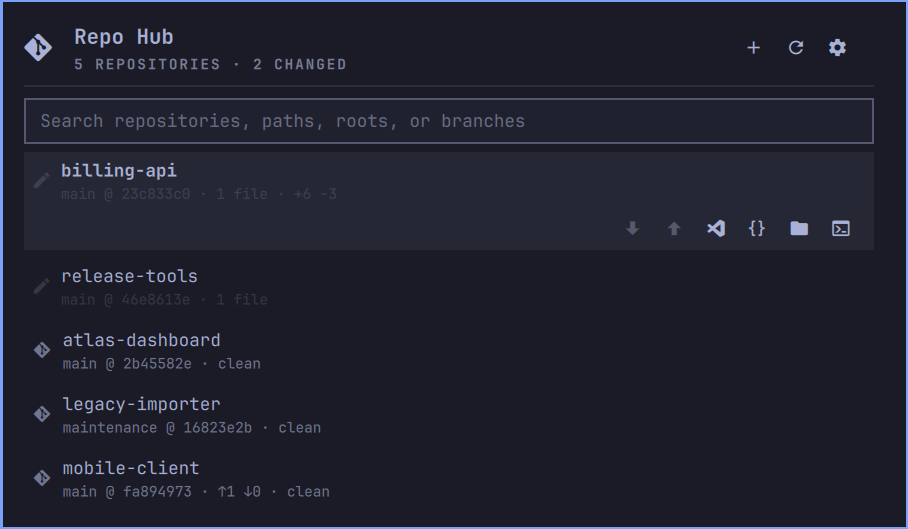
What it shows
Each repository row displays the active branch with its short HEAD hash and relative commit age, upstream divergence, changed-file count, and tracked line additions and deletions. The tooltip adds the full path, staged/unstaged/untracked/conflicted counts, upstream, latest commit, last fetch, stash count, submodule attention, and an active merge, rebase, cherry-pick, revert, or bisect.
The list is searchable and scrollable. Select a repository to reveal one compact action strip instead of repeating six buttons on every row:
| Action | Behavior |
|---|---|
| Fetch | Runs git fetch --prune and updates ahead/behind state without changing the working tree. |
| Pull | Runs git pull --ff-only for the active branch and its existing upstream. |
| Push | Runs an ordinary git push; the first push uses origin, or the only remote, and sets the upstream. |
| VS Code | Opens the repository with code --reuse-window. |
| Editor | Opens $VISUAL, $EDITOR, or the system text editor. Folder-aware editors receive the repository; file-oriented editors open a useful project file from the repository working directory. |
| Files | Opens the repository with the default file manager through xdg-open. |
| LazyGit | Opens LazyGit in an Omarchy terminal at that repository. |
| Favorite | Pins or unpins the repository at the top of every sort mode. |
| More | Opens a secondary strip for Terminal, remote browser, copy path/remote URL, and repository alias. |
Repo Hub never force-pushes, merges, rebases, autostashes, resets, checks out, or discards work. A pull that cannot fast-forward fails with an explanation and leaves the repository untouched.
Repository discovery
The initial root is ~/Projects. Add or remove roots from the settings screen by typing a directory or using the folder picker. Changes are saved immediately.
Scanning is recursive to a configurable depth, initially four levels below each root. Once a repository is found, traversal stops below it so submodules and nested repositories do not flood the list. Symlinks are not followed, and common dependency, cache, virtual-environment, build, and generated-output directories are pruned. Add folder names or glob patterns such as archive-* to the configurable ignore list for local layouts that need additional pruning.
Five ordering modes are available; favorites remain first in every mode:
| Mode | Order |
|---|---|
| Attention first | Inspection errors, conflicts, changed repositories, then clean repositories. |
| Alphabetical | Repository name, then path. |
| Grouped by root | Configured root order, then repository name. |
| Latest commit | Newest commit first; repositories without commits appear last. |
| Recently opened | Most recently launched repositories first. |
The filter next to search can show all, changed, clean, ahead, behind, or conflicted repositories. The selected filter is saved and restored between sessions. Search also matches aliases.
Opening the panel performs an immediate silent scan. Automatic refresh runs only while the panel remains open and never fetches remotes. Its interval can be set from 0 to 600 seconds; 0 disables automatic refresh. Search text, selection, scroll position, settings controls, and clone fields are preserved when a refresh completes.
Cloning
The header Clone action accepts HTTPS URLs, ssh:// URLs, and SCP-style SSH URLs such as git@github.com:owner/project.git. Choose one configured destination root and optionally override the inferred folder name. Cloning runs in the background with phase and percentage updates. It can be cancelled; Repo Hub terminates the clone process and removes the unfinished destination.
Authentication comes from the existing SSH agent or Git credential helper. Repo Hub disables interactive Git prompts and never asks for, stores, or logs credentials. Clone URLs containing embedded HTTPS credentials are rejected. Existing destinations, path traversal, and destinations outside the selected root are also rejected.
Requirements
- Omarchy Quattro (4.x) with the shell plugin system.
- Git.
- Python 3.11 or newer. The helper uses only the Python standard library.
Optional integrations are detected independently. VS Code and LazyGit are hidden when unavailable; other missing tools disable only their own button:
- Visual Studio Code (
code) - LazyGit
zenityfor the graphical root-folder pickerxdg-openfor the default file managerxdg-terminal-execfor “Terminal here” and terminal editorswl-copyfor copying paths and remote URLsnotify-sendfor optional new-behind notifications$VISUAL,$EDITOR, or a system text-editor association
Repo Hub treats Neovim, Vim, Emacs, Zed, Sublime, and common IDE launchers as folder-aware. For file-oriented terminal editors such as Micro and Nano, it starts the terminal in the repository directory and opens README, then the first tracked text file, or an empty buffer when the repository has no suitable file.
Installing
Once the repository is published:
omarchy plugin add https://github.com/vip32/omarchy-repo-hub
omarchy plugin enable vip32.repo.hub
omarchy bar move vip32.repo.hub --section right
For local development, place or link the repository at:
~/.config/omarchy/plugins/vip32.repo.hub
Then enable it with the final two commands above. Omarchy hot-reloads changes under the installed plugin folder.
Controls
| Control | Action |
|---|---|
| Left-click the Git icon | Open or close Repo Hub. |
| Middle- or right-click the icon | Refresh repository state. |
| Clone header action | Open the clone form. |
| Fetch-all header action | Fetch and prune remotes for all discovered repositories. |
| Refresh header action | Run an immediate visible refresh. |
| Filter next to search | Limit the list by Git state; the choice is remembered. |
| Settings header action | Manage roots, ignore patterns, depth, refresh, fetch behavior, notifications, and ordering. |
| Click a repository | Select it and reveal its action strip. |
J / K or arrow keys |
Move the selected repository. |
Enter |
Open the selected repository in the default editor. |
/ |
Focus search. |
R, C, S |
Refresh, clone, or open settings. |
Escape |
Leave the current screen, clear search, or close the panel. |
Settings and privacy
Preferences are stored in ~/.config/omarchy-repo-hub/settings.json with mode 0600:
{
  "roots": [
    "~/Projects"
  ],
  "scanDepth": 4,
  "autoRefreshSec": 30,
  "sortMode": "attention",
  "activeFilter": "all",
  "ignoredPatterns": [],
  "favorites": [],
  "aliases": {},
  "recent": [],
  "lastFetched": {},
  "fetchTimeoutSec": 60,
  "notifyBehind": false
}
The helper reads repository metadata and executes Git only inside configured roots. It does not send analytics, collect repository contents, access hosting-provider APIs, or run background scans while the panel is closed. Remote access occurs only after an explicit Fetch, Pull, Push, or Clone action. Clone job state is stored privately below ~/.cache/omarchy/repo-hub; the source URL is removed from that state as soon as the worker starts.
Git behavior and edge cases
- Ahead and behind counts use existing local remote-tracking refs. Use Fetch or Pull to update those refs.
- Pull is disabled for detached HEAD or a branch without an upstream.
- Push is disabled for detached HEAD, repositories without remotes, and repositories with multiple remotes but no
originor upstream. - Untracked files are included in the changed-file count but not in added/deleted line totals.
- Binary changes count as changed files but do not contribute line totals.
- Repositories without commits show their active unborn branch and sort last in Latest commit mode.
- One mutating Git action runs at a time from the panel, while navigation remains responsive.
- Fetch timeout is configurable from 10 to 600 seconds. Fetch-all reports partial failures with repository names.
- Repo Hub does not create or manage worktrees and does not run repository-specific project commands.
Removing it
omarchy plugin remove vip32.repo.hub
Removing the plugin does not change, remove, reset, or clean any repository. To remove its preferences as well, move ~/.config/omarchy-repo-hub to Trash.
Helper CLI
The standard-library helper prints machine-readable JSON and can be used independently:
bin/repohubctl.py status
bin/repohubctl.py settings-set scanDepth 5
bin/repohubctl.py settings-set autoRefreshSec 0
bin/repohubctl.py settings-set sortMode recent
bin/repohubctl.py settings-set activeFilter dirty
bin/repohubctl.py settings-set fetchTimeoutSec 90
bin/repohubctl.py root-add ~/Work
bin/repohubctl.py root-remove ~/Work
bin/repohubctl.py ignore-add 'archive-*'
bin/repohubctl.py favorite-set ~/Projects/example true
bin/repohubctl.py alias-set ~/Projects/example "Example App"
bin/repohubctl.py fetch ~/Projects/example
bin/repohubctl.py fetch-all
bin/repohubctl.py pull ~/Projects/example
bin/repohubctl.py push ~/Projects/example
bin/repohubctl.py clone-start git@github.com:owner/example.git ~/Projects "Example"
bin/repohubctl.py launch lazygit ~/Projects/example
Run bin/repohubctl.py --help for the complete command list.
Development
Validate the manifest, QML, Python, and dependency-free test suite before publishing:
omarchy plugin validate .
qmllint -I /usr/share/omarchy/shell Panel.qml
python3 -m py_compile bin/repohubctl.py
python3 -m unittest discover -s tests -v
The tests create temporary local repositories and bare remotes. They do not access the network or modify repositories outside their temporary directory.
License
MIT. See LICENSE.