
HabitGrid
A contribution graph for your life.
The graph that got you to code every day — now for everything else.
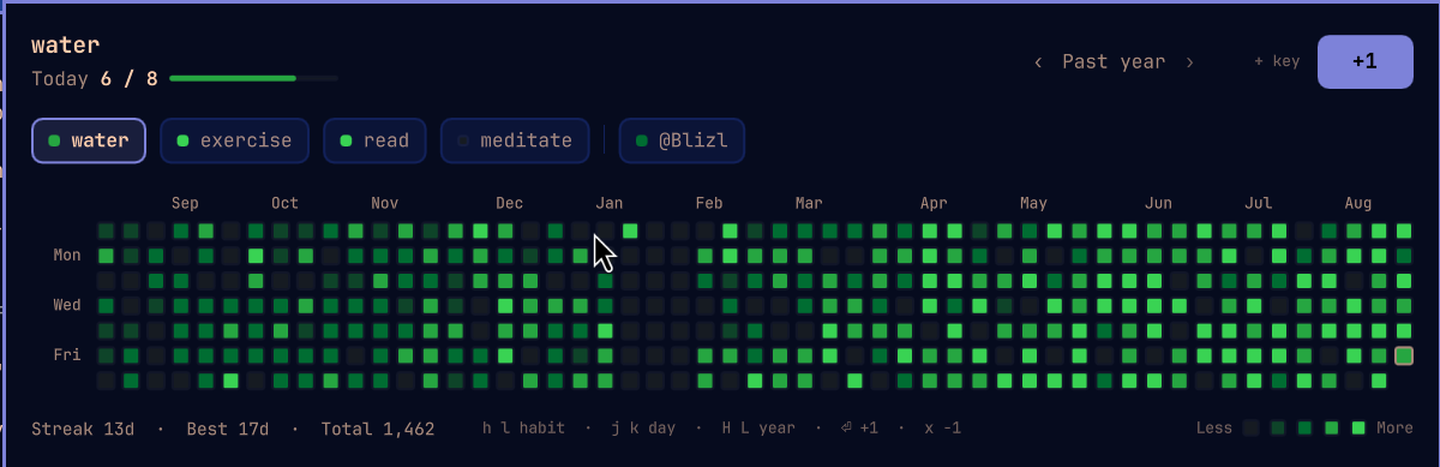
HabitGrid is an Omarchy shell plugin. Press
Super+Shift+H, press Enter, and today's square turns green. That is the
whole interaction.
- One keystroke to log. No app to open, no form, no sync spinner.
- A year at a glance. 53 weeks of every habit, GitHub-style, with hover values and streaks.
- Your data is a markdown file in your own vault. No account, no cloud, no database. Open it in Obsidian and it reads like notes, because it is notes.
Backends: the same panel, other data
The panel does not know what a habit is. It asks a backend for counts per day, and draws them. Point it at GitHub and the same chip row carries your commit graph next to your water intake.
{
  "sources": [
    { "backend": "obsidian-markdown", "file": "~/Obsidian/MyVault/Habits.md" },
    { "backend": "github-contributions", "username": "your-handle" }
  ]
}
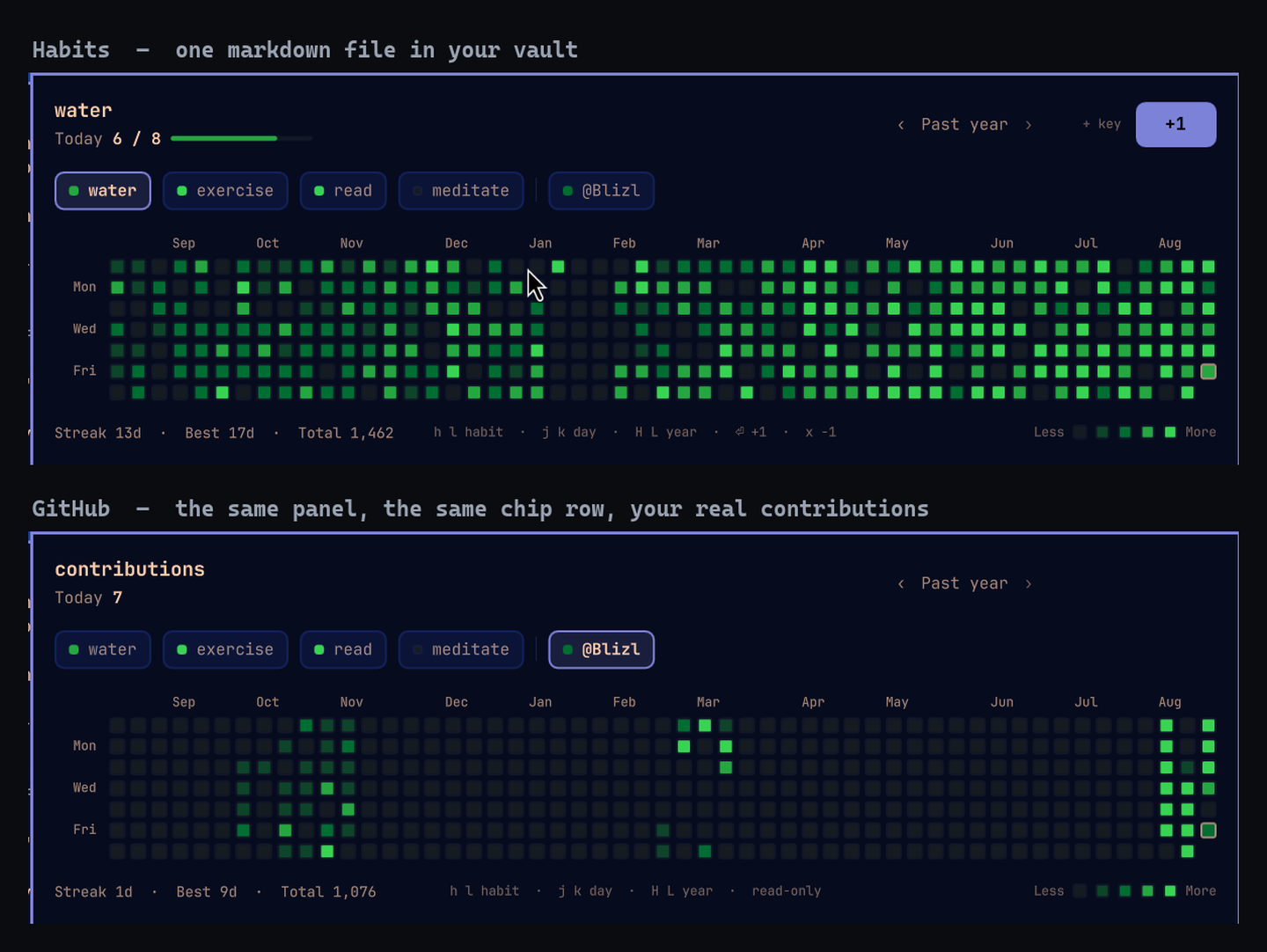
Two backends ship with the plugin: obsidian-markdown (the default, and the
one this is really for) and github-contributions (read-only). Up to four can
be active at once, and writing a third of your own is
about sixty lines.
Install
omarchy plugin add https://github.com/Blizl/Omarchy-HabitGrid --enable && ~/.config/omarchy/plugins/vliang.habitgrid/bin/setup
omarchy plugin add fetches the plugin and --enable puts it on the bar.
bin/setup then does the two things a plugin is not allowed to do for itself:
write a first-run config and bind Super+Shift+H. Both halves are safe to
re-run — an existing config is kept, and the keybinding block is rewritten in
place rather than appended a second time.
| Flag | Effect |
|---|---|
bin/setup --skip-keybindings |
set up without touching your Hyprland config |
bin/setup --override-keybindings |
take Super+Shift+H even if something else owns it |
What it touches. No files outside
~/.config/omarchy/plugins/vliang.habitgrid, ~/.config/habitgrid,
~/.cache/habitgrid, the habit file you point it at, and — only with your
consent — ~/.config/hypr/bindings.lua are modified. Nothing runs in the
background and nothing phones home.
git clone https://github.com/Blizl/Omarchy-HabitGrid ~/src/habitgrid
~/src/habitgrid/install.sh
omarchy plugin enable vliang.habitgrid center
install.sh copies the checkout into the plugins directory, deletes files an
older version left behind, and then runs bin/setup for you — same flags,
same result.
./uninstall.sh removes the plugin and the binding; ./uninstall.sh --keybinding-only removes just the binding. Neither touches your habit file.
Requirements: Omarchy 4.x (Quattro) and Python 3.11+. Nothing else — no pip install, no node, no daemon.
Try it before you track anything
The repo ships a year of sample history. Point the config at it and the panel is full immediately:
{
  "sources": [
    { "backend": "obsidian-markdown",
      "file": "~/.config/omarchy/plugins/vliang.habitgrid/demo/Habits-demo.md" }
  ]
}
Switch the path back to your own file when you have seen enough.
Using it
Super+Shift+H |
open / close the panel |
h l or ← → |
previous / next habit |
j k or ↑ ↓ |
move the cell cursor a day, showing that day's value |
w b |
move the cell cursor a week |
Enter / Space / + |
+1 today for the selected habit |
x |
−1 today — the undo for a mis-tapped +1. At zero the count visibly refuses rather than doing nothing |
1–9 |
jump to the nth habit |
[ ] |
previous / next habit, cycling |
H L |
previous / next year |
0 |
back to the rolling past year |
n |
new habit — type a name, Enter creates it, Esc backs out |
e |
edit the selected habit — the goal first; ↑ ↓ (or Tab) moves between goal and name. Enter saves both, Esc cancels, empty or 0 clears the goal |
d |
delete the selected habit — asks first; Enter confirms, Esc keeps |
Esc |
close |
With the mouse: click a chip to switch habits, click +1 or today's square to
log, hover any square for its exact value. Right-clicking today is the same
undo as x. Middle-clicking the bar icon re-reads the file without opening
anything, and the icon lights up once every habit has been logged today.
Every change answers in the same frame: today's square swells on a +1 and
dips on an x, and the header's count rolls the same way — bigger means more,
smaller means less. The number moves on the keystroke rather than after the
file has been written, so holding + climbs smoothly and a press that lands
while a write is still going is queued rather than dropped. The grid never
guesses: its colours change only once the file has been re-read, so if a square
moved, something was written.
Adding a habit without leaving the panel
The + at the end of the graph — or the n key — turns the end of the chip
row into a field you type a name into. Enter writes - <name> to your habit
file, the chip appears and is selected; Esc leaves nothing behind. A name may
not contain : or |, and a habit you already have is refused rather than
written twice — including one that differs only in case, so typing Water
at a file that has water answers "habit 'water' is already defined" instead
of leaving you with two chips a letter apart. Either way the reason appears
next to the field.
A goal goes in the same field. Type water | goal: 8 — or just
water | 8 — and the habit is created with a target of eight times a day,
written to the file as SPEC's - water | goal: 8. Without one the habit is
still tracked; it just scales its colours against your own typical day instead
of a target. A goal has to be a positive whole number, and the reason a
particular one was refused appears next to the field like any other.
The + is only there when a source can hold a new habit, so a panel showing
nothing but a GitHub calendar does not offer it.
Editing a habit without leaving the panel
e edits both things a habit is, each where you already read it. The header's
6 / 8 becomes 6 / [8] with the number selected, and the habit's name above
it becomes a field too. Type 12, press Enter, and the line in your file
becomes - water | goal: 12. Esc leaves both alone.
The goal has the keyboard first, because it is the edit you usually came
for. ↑, ↓, Tab and Shift+Tab all move to the other field — any of them,
either way round, so no arrow is ever dead — and clicking the other field does
the same thing. Nothing is written by moving between them; what you have typed
into one stays in it. Enter saves the edit, not just the field you pressed it
in.
The field that does not have the keyboard is still obviously editable: both are chips, and the one holding the keyboard wears the accent border the selected chip wears. That is the whole difference, and the ring fades across when you switch.
Clear the goal field — or type 0 — and the goal comes off. The habit
stays exactly where it is, with all of its history, and goes back to scaling its
colours against your own typical day. A habit that never had a goal can be given
one the same way, without deleting and re-creating it.
Renaming takes the history with it. The - water in your ## Definitions
becomes - hydrate, and so does every - water: 6 in the log — that is the
whole point of the operation, and it is why the graph does not go dark when you
fix a name you regret. Everything else in the file is byte-for-byte as it was:
if your definition line is - Morning Café | goal: 3, only the name's own
bytes change, and - Morning Café : 2 in the log keeps its own spacing too.
The habit also keeps its place in the chip row — renaming is not deleting and
re-adding.
A name another habit already has is refused, including one that differs only
in case, and the message names the spelling that exists so the fix is obvious.
Changing only the capitalisation of a habit's own name is allowed, though —
Water to water is a real rename, and the log follows it like any other.
When you change the name and the goal at once, the name is written first and the goal against the new name, so there is only ever one name in flight. If the rename is refused nothing at all is written; if the rename lands and the goal is turned down, the new name is already real and only the goal is left open beside its reason.
e is offered for a habit whose source can change a goal or a name — either is
enough, and the panel opens on whichever it has — and not while you are looking
at a past year.
Deleting a habit without leaving the panel
d asks — the header turns into Delete water? · its history stays in the
file, the chip goes red, and the footer offers ⏎ delete · esc keep. Enter
deletes; Esc, or any other key, keeps. One keystroke never deletes anything,
which is why there is no button for it — the same reason x has none.
What it deletes is the definition, not the history. The - water line
leaves your ## Definitions list and every - water: 6 in the log stays
exactly where it is, so adding the habit back later brings the whole graph back
with it. The panel then selects the next chip along, or falls into the empty
state if that was the last habit.
d is offered only for a habit whose source can undefine one, and not while
you are looking at a past year.
Looking at a past year
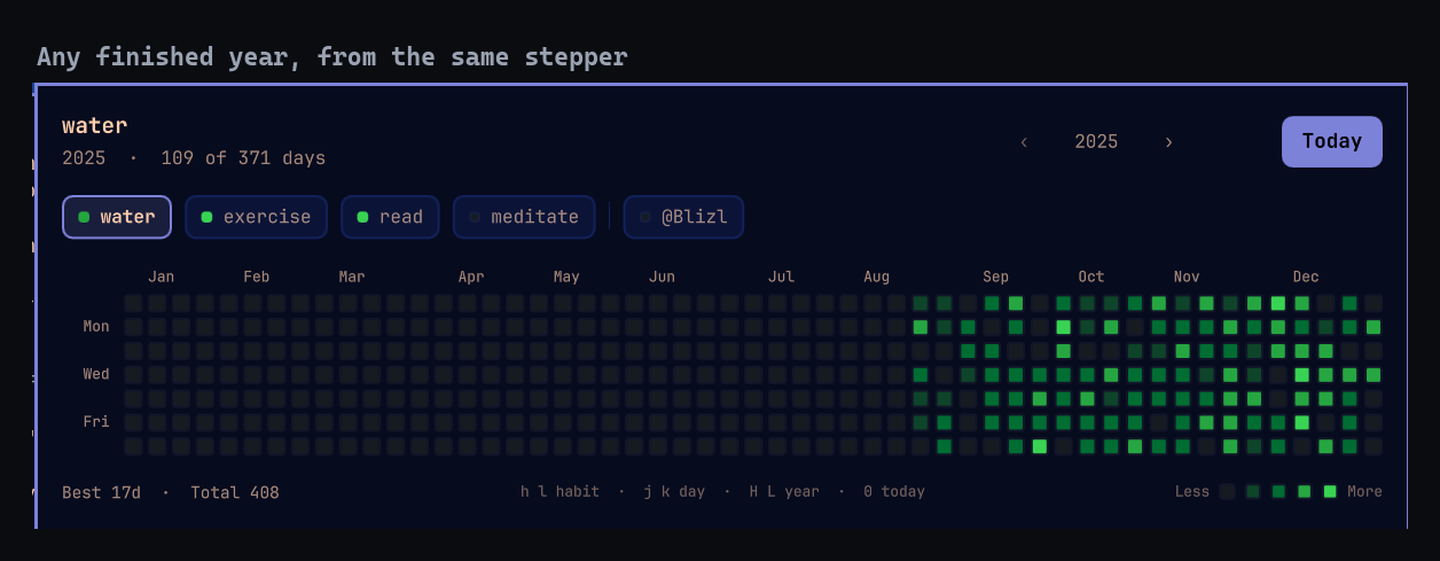
The stepper in the header walks back through the years you have data for.
Every view is the same shape — 53 weeks — so nothing moves when you step; only
the anchor changes. A past year is read-only: the +1 becomes a Today
button that takes you back, the header counts the year instead of the day, and
the stats drop the current streak because a closed year does not have one.
Years appear in the stepper once they are over and have something in them, so a new user never sees the control at all.
Track your habits in Obsidian
The default backend keeps everything in one markdown file in your vault.
1. Point it at your vault
~/.config/habitgrid/config.json:
{
  "sources": [
    { "backend": "obsidian-markdown", "file": "~/Obsidian/MyVault/Habits.md" }
  ]
}
The default is ~/Obsidian/2026_Notes_Sync/Habits.md. If the file does not
exist, HabitGrid creates it from the starter below, so you can skip this step
entirely and move the file later.
2. The file
# Habits

## Definitions

- water | goal: 8
- exercise | goal: 1
- read

## Log

### 2026-08-21

- water: 6
- exercise: 1
That is the whole format.
## Definitionsis your habit list, in the order the chips appear.| goal: Nis optional — a habit without one is still tracked, it just scales its colours against your own typical day instead of a target.## Logholds one### YYYY-MM-DDsection per day, newest first, with one- habit: countline per habit. Days you skipped simply are not there.
Three promises about that file:
- It is a normal note. Open it in Obsidian, put it in a folder, link to it, add frontmatter.
- Anything else you write in it is preserved untouched. Prose, tags, headings, HTML comments — HabitGrid rewrites the one count line it is changing and leaves every other byte exactly as it found it.
- Edits in Obsidian show up in the panel within the pull interval (30s by default), or instantly if you middle-click the bar icon.
3. Adding, renaming, removing habits
Edit the ## Definitions list in Obsidian. Add a line, and the chip appears.
Delete a line, and the chip goes away — the history stays in the log, so
putting the habit back brings its graph back with it.
Adding, editing and deleting are also keys. The + at the end of the graph (or
n) appends a - <name> line — - <name> | goal: N if you typed a goal — at
the end of the list, and touches nothing else in the file. e rewrites the
| goal: N on one line, or the name on that line and on every log line that
carried it, and leaves every other byte where it was. d asks first and then
takes that one definition line back out, leaving the log intact.
bin/habitgrid add <name> [--goal N], bin/habitgrid goal <name> <N>,
bin/habitgrid rename <name> <new-name> and bin/habitgrid remove <name> do
the same from a terminal.
Renaming by hand in Obsidian still works, and it is still two edits: the
definition line and every log line under it. e is the one that does both.
4. Syncing
HabitGrid reads and writes one markdown file, so any vault sync works: Obsidian Sync, Syncthing, or a vault inside a Drive/iCloud folder. There is no account or API in the plugin at all.
Writes are safe across devices: every +1 re-reads the file immediately
before writing and changes only the line it owns, then swaps the new file
into place atomically. Two devices incrementing the same day cannot truncate
each other's work, and a reader never sees a half-written file.
5. When something looks wrong
| Symptom | Cause |
|---|---|
| Panel says "No habits defined yet" | The file has no ## Definitions list, or the path points somewhere else. Run bin/habitgrid config to see the path in effect. |
| A habit you added is missing | Its line does not match `- name |
| Counts look stale | The vault has not synced yet, or the pull interval has not elapsed. Middle-click the bar icon. |
| Nothing at all | bin/habitgrid list prints the same data as the panel and the same errors, straight to your terminal. |
Errors from the backend appear in the panel itself rather than being swallowed.
Link your GitHub
The github-contributions backend renders your real contribution graph in the
same panel. It is read-only: no +1 button, because nobody commits by clicking
a square.
{
  "sources": [
    { "backend": "github-contributions", "username": "your-handle" }
  ]
}
That is the whole setup for a public profile — no token, no OAuth, no
account linking. It reads the same public contributions page anyone can see
at github.com/your-handle.
Add it alongside your habits rather than instead of them, and both live in one chip row:
{
  "sources": [
    { "backend": "obsidian-markdown", "file": "~/Obsidian/MyVault/Habits.md" },
    { "backend": "github-contributions", "username": "your-handle" }
  ]
}
Private contributions (optional)
To count contributions to private repositories, add a personal access token:
{
  "sources": [
    { "backend": "github-contributions", "username": "your-handle", "token": "ghp_..." }
  ]
}
A classic token needs the read:user scope; a fine-grained token needs no
extra permissions beyond the default read access to your own profile. With a
token the backend uses GitHub's GraphQL API instead of the public page.
Switching back
Delete the GitHub entry from sources, or move it after your habits so the
default selection lands on a habit again. Nothing else changes, and no data is
touched either way: the GitHub backend only ever reads.
When something looks wrong
| Symptom | Cause |
|---|---|
| "no such GitHub user: x" | Check the handle. It is the name in your profile URL, not your display name. |
| "GitHub refused the request (HTTP 403)" | Rate limited, or a bad token. The public page allows plenty of requests for a 5-minute refresh; wait a few minutes. |
| Squares look right but are hours old | Expected. The backend caches and never asks GitHub more than once every 5 minutes, whatever the pull interval says. |
| Offline | The last successful calendar is served from cache, so the panel keeps working. It only errors if there is no cache at all. |
Follows your theme
Run omarchy theme set and the panel follows: background, border, chips, the
+1 button, focus rings, tooltip. The contribution squares stay green,
because green means done — a red or pink ramp reads as a warning, and the
accent is already doing work as the button and the selection.
▶ design/theme-switching.mp4 — 20 seconds of the same panel through Catppuccin, Nord, Catppuccin Latte and Rose Pine. Only the light and dark variants of the green ramp swap, following the theme's own lightness.
With the panel open, a theme change crossfades rather than jumps: the whole
palette eases across together over about 400ms. Set
HABITGRID_THEME_TRANSITION=none in the shell's environment if you would
rather it switched instantly.
If you would rather the squares matched your accent, set "palette": "theme":
{ "palette": "theme" }
It builds a four-step ramp from your accent with an explicit lightness spine,
and moves the focus ring and the +1 button to neutral so they stay legible
against it. "github" (the default) and "theme" are the only two values, on
purpose — see design/DESIGN.md §14.
Configuration
~/.config/habitgrid/config.json. Every field is optional; delete the file and
everything falls back to the defaults below.
{
  "sources": [
    { "backend": "obsidian-markdown", "file": "~/Obsidian/MyVault/Habits.md" },
    { "backend": "github-contributions", "username": "your-handle" }
  ],
  "palette": "github",
  "sync": { "pullIntervalSeconds": 30, "pushMode": "immediate" }
}
| Field | Default | Meaning |
|---|---|---|
sources |
one markdown source | An ordered list of active backends. Each entry is a backend plus that backend's options. Max 4. |
sources[].backend |
— | A bundled backend's name, or an absolute path (~ allowed) to your own executable. |
palette |
"github" |
"github" for the fixed contribution greens, "theme" to derive the ramp from your accent. |
sync.pullIntervalSeconds |
30 |
How often to re-read from the backends. |
sync.pushMode |
"immediate" |
Only immediate is implemented: a +1 is written the moment you press it. |
Chips appear with the loggable habits first, then the other sources in the order you listed them, with a divider between groups.
<details> <summary>The older single-backend config still works</summary>{
"backend": "obsidian-markdown",
"backends": {
"obsidian-markdown": { "file": "~/Obsidian/MyVault/Habits.md" }
}
}
This is read as a one-element sources list. Nothing needs changing unless you
want a second source.
Bundled backend options:
| Backend | Option | Default | Meaning |
|---|---|---|---|
obsidian-markdown |
file |
~/Obsidian/2026_Notes_Sync/Habits.md |
The habit file. Created if missing. |
github-contributions |
username |
— | Required. The GitHub handle to read. |
github-contributions |
token |
— | Optional PAT for private contributions. |
github-contributions |
minRefreshSeconds |
300 |
Floor on how often GitHub is asked. |
A malformed config never stops the plugin: it falls back to defaults and says
why. bin/habitgrid config prints exactly what took effect.
Command line
The panel runs bin/habitgrid and nothing else, so anything it can do, you can
do from a terminal or a script:
bin/habitgrid list                 # every habit: today, streak, best, total
bin/habitgrid list --year 2025     # the same, for one year
bin/habitgrid increment water      # +1 for today, prints the new count
bin/habitgrid decrement water      # -1, floored at zero
bin/habitgrid add stretch          # define a new habit, prints its name
bin/habitgrid add water --goal 8   # ...with a target of 8 times a day
bin/habitgrid goal water 12        # retarget an existing habit
bin/habitgrid goal water 0         # ...or take its goal off, keeping the habit
bin/habitgrid rename water hydrate # rename it, log lines and all
bin/habitgrid remove stretch       # undefine it again, keeping its history
bin/habitgrid view --habit water   # the exact JSON the panel renders
bin/habitgrid config               # the effective configuration
bin/habitgrid backend              # which executable would run
--date YYYY-MM-DD pretends it is another day, --config PATH uses another
config file, and --source N picks which source a habit belongs to when two
of them use the same name. add takes --source N too, for a config with more
than one writable source; without it the habit goes to the first source that
says it can hold one. remove, goal and rename are the other way round:
they go to the source that has the habit, and say so when no source does.
Writing your own backend
A backend is an executable implementing two verbs — list and increment —
plus any of five optional ones it has an answer for. Point backend at its
absolute path and it is in charge of everything the panel shows.
<backend> list
Print one JSON object on stdout and exit 0:
{
  "canIncrement": true,
  "canAdd": true,
  "canRemove": true,
  "canSetGoal": true,
  "canRename": true,
  "years": [2026, 2025, 2024],
  "habits": [
    {
      "name": "water",
      "label": "water",
      "goal": 8,
      "today": 5,
      "history": { "2026-08-21": 5, "2026-08-20": 8, "2026-08-18": 3 }
    }
  ]
}
| Field | Type | Required | Notes |
|---|---|---|---|
habits[].name |
string | yes | Non-empty. Habits without one are skipped. |
habits[].label |
string | no | What the chip shows, when that differs from the name the tooltip reads out. Defaults to name. |
habits[].goal |
positive integer or null |
no | null, 0 or absent means "no goal": the ramp then scales against the habit's own typical day. |
habits[].today |
non-negative integer | no | Today's count. Absent falls back to history[today], then 0. |
habits[].history |
object | yes | {"YYYY-MM-DD": count} covering the display window. Only days with data need to appear. |
canIncrement |
boolean | no | false hides the +1 button and makes the increment keys inert for this source's chips. Anything else, including absent, means writes are accepted. |
canAdd |
boolean | no | true — and only a literal true — puts the panel's + on screen and lets habitgrid add route new habits here. The opposite default to canIncrement: increment has always been part of the contract, add has not, so silence means "does not implement it". |
canRemove |
boolean | no | true — and only a literal true — offers the panel's d for this source's chips. Its own flag rather than a second reading of canAdd, because they are two optional verbs: a backend that implements add and not remove says canAdd: true truthfully, and must not be asked to delete. |
canSetGoal |
boolean | no | true — and only a literal true — offers the goal field of the panel's e for this source's chips. One flag per optional verb, for the same reason: implementing add and remove says nothing whatever about set-goal. |
canRename |
boolean | no | true — and only a literal true — offers the name field of the panel's e. Its own flag again, and this one asks for more than the others: the habit's whole history has to follow the name, so a backend that can only rewrite a definition must leave it out. |
years |
array of integers | no | Years you hold data for beyond the window you just sent, for the year stepper. Without it the stepper only offers years the visible history happens to touch. |
<backend> list --year YYYY
The same output, restricted to that calendar year. A backend that ignores the flag still works — the panel windows whatever it gets — but honouring it keeps the payload small.
history is what the graph, the hover values and the streaks are made of, so
report at least HABITGRID_HISTORY_DAYS days back from today. A backend that
returns less still works; the graph is just emptier.
Chips appear in the order you print them, and the first habit is selected when the panel opens.
<backend> increment <name>
Add 1 to that habit for today, print the single updated habit object — the
same shape as one element of habits — and exit 0:
{ "name": "water", "goal": 8, "today": 6, "history": { "2026-08-21": 6 } }
<backend> decrement <name> (optional)
The same, one lower, floored at zero. Backends that do not implement it exit non-zero and the panel reports that; nothing else breaks.
<backend> add <name> [--goal N] (optional)
Define a habit that does not exist yet — no counts — and print the new habit
object, the same shape as one element of habits:
{ "name": "stretch", "goal": null, "today": 0, "history": {} }
--goal N is passed only when the user asked for one, so a backend that
predates goals still handles a plain add. N arrives as text, unvalidated:
you are the one storing it, so you are the one who decides what a goal may be.
Only offered to backends whose list says "canAdd": true. Refuse anything
you cannot store, non-zero and on stderr, rather than storing an approximation
of it: the reason is shown beside the field the user is still typing in, so
"habit 'water' is already defined" is a useful answer and "invalid" is not.
The bundled markdown backend refuses an empty name, a name containing : or
| (SPEC forbids both), a habit it already has under any capitalisation,
and a goal that is not a positive whole number. Note that the case-folding is
a rule about creating a habit, not about reading one: everything that
parses the file matches names exactly, because every log line ever written did
too.
<backend> set-goal <name> <goal> (optional)
Change the daily goal of a habit that exists, and print the updated habit object:
{ "name": "water", "goal": 12, "today": 5, "history": { "2026-08-21": 5 } }
<goal> arrives as text, unvalidated, exactly like add --goal. Two spellings
mean the same thing and both are yours to honour: 0 and an empty string
mean "take the goal away" — the habit stays, with its history, and goes back
to being levelled against its own typical day. This is the one place 0 is a
request rather than a mistake, which is why add --goal 0 is refused with
"a goal of 0 is the same as no goal — leave it out" and set-goal water 0
simply does it.
Only offered to backends whose list says "canSetGoal": true. Refuse a habit
you do not have, and a goal you cannot store, non-zero and on stderr; the
reason appears beside the field the user is still typing in.
The bundled markdown backend rewrites only the | goal: N on the habit's
definition line, so the name keeps the exact spelling, casing and spacing the
user gave it, and every log line written against that spelling still matches.
A habit's position in the list never changes either: retargeting is not
deleting and re-adding.
<backend> rename <name> <new-name> (optional)
Give a habit that exists another name, and print the updated habit object, under the name it now has:
{ "name": "hydrate", "goal": 8, "today": 5, "history": { "2026-08-21": 5 } }
The history must follow the name. That is the whole operation, and it is
what tells it apart from remove-and-recreate, which deliberately leaves the old
counts where they are. A backend that can rewrite a habit's name but cannot
carry its past along must not advertise canRename: half a rename splits
one habit into two that no client can rejoin, and the panel would have no way
to know it had happened.
Only offered to backends whose list says "canRename": true. Refuse a habit
you do not have, a name you cannot store, and a name another habit already owns
— naming the spelling that exists, as add does — non-zero and on stderr; the
reason appears beside the field the user is still typing in. A rename to the
name the habit already has is a no-op rather than an error: an editor prefilled
with the current name and submitted unchanged is how people look at things.
The bundled markdown backend rewrites the name's bytes on the definition line and on every log line that carried it, in every date section, later duplicates included — and nothing else, so the goal's own spacing, the counts and the bullets all survive. It refuses a rename when the habit is defined twice over (a sync conflict): renaming around the duplicate would leave one copy holding the entire history and promote the other to a habit with none. A rename that only changes capitalisation is allowed, since a habit cannot collide with itself.
<backend> remove <name> (optional)
Undefine a habit that exists, and print the name that is now gone:
{ "name": "stretch", "removed": true }
Only offered to backends whose list says "canRemove": true. What happens
to the history is yours to decide, and to say in your docs. The bundled
markdown backend keeps every logged count and removes only the
## Definitions line, so re-adding the name restores the whole grid — which
is what makes the panel's one-key delete a small enough decision to take
without a dialog. A backend that genuinely destroys data should say so loudly
somewhere the user will read it before pressing d.
Refuse a habit you do not have, non-zero and on stderr; the panel shows the reason rather than pretending something was deleted.
Errors
Exit non-zero with one human-readable line on stderr. The panel shows that line instead of the graph; it does not crash or blank. Unparseable stdout is reported the same way.
What the backend is told
Configuration arrives in the environment, so a backend in any language can read it without an argument parser:
| Variable | Example | Meaning |
|---|---|---|
HABITGRID_BACKEND |
obsidian-markdown |
The configured backend string. |
HABITGRID_TODAY |
2026-08-21 |
The date the plugin considers today. Honour it. |
HABITGRID_HISTORY_DAYS |
371 |
How many days of history to report. |
HABITGRID_OPT_* |
HABITGRID_OPT_FILE |
One per key under backends.<backend>. |
Option keys become variable names by upper-casing and splitting camelCase:
file → HABITGRID_OPT_FILE, apiToken → HABITGRID_OPT_API_TOKEN,
base-url → HABITGRID_OPT_BASE_URL. Strings and numbers arrive as text,
booleans as true/false, arrays and objects as compact JSON.
The backend inherits the shell's environment, must not need a terminal, and has 15 seconds to answer.
A complete backend
tests/fixtures/fake-backend is a conforming
backend in bash that has never heard of markdown — the test suite uses it to
prove the panel works against any implementation. Copy it as a starting point.
How the colours are decided
The colour of a square is the only thing the graph encodes, so it is worth knowing the rule:
level 0        count is zero
level 1..4     clamp(ceil(4 × count / reference), 1, 4)

reference =    the habit's goal, when it has one
               otherwise the 75th percentile of its active days
So with a goal, level 4 means you met it. Without one, a typical day for that habit is level 4 — which is why a GitHub calendar with one 300-commit afternoon still shows an ordinary week as green rather than as a faint smear.
Streaks count consecutive days with any activity, ending today, or ending yesterday when today is still empty — an unlogged morning is not a broken streak.
Layout
| Path | What |
|---|---|
BarWidget.qml |
The bar slot: an icon, a tooltip, and the open/close contract the bar routes through. |
Panel.qml |
The panel: chips, header, +1, stats, tooltip, keyboard. |
ContributionGraph.qml |
The graph. Draws a finished model — no dates, no goals, no habit-file knowledge. |
HabitNameField.qml |
The inline chip you type into: a new habit's name — and goal — for n, an existing habit's goal for e. |
DesignTokens.qml |
Every colour and measurement, themed or fixed, in one place. |
bin/habitgrid |
Front-end: config, backend resolution, streaks and levels. All the QML ever runs. |
bin/setup |
Post-install: a first-run config and the keybinding. What omarchy plugin add cannot do for us. |
bin/habitgrid-obsidian-markdown |
Default backend: one markdown file in a vault. |
bin/habitgrid-github-contributions |
Read-only backend: a GitHub contribution calendar. |
lib/ |
The logic behind those: config, display maths, markdown, GitHub, keybindings. |
design/DESIGN.md |
The implementation spec this UI is built from. |
demo/Habits-demo.md |
A year of sample history. |
The QML is deliberately thin: it renders JSON and shells out. Almost every rule
worth testing lives in Python. The one thing the panel decides for itself — how
a keypress answers before the file has caught up with it — is tested in QML,
headlessly, in tests/qml/.
Tests
./tests/run              # everything
./tests/run markdown     # only suites whose name matches
No display, no network, no real habit file: the shell suites run against a
throwaway $HOME under /tmp, the GitHub suite parses a fixture, and the QML
is type-checked against the real shell modules when Qt's qmllint is present.
motion_test.sh goes further and runs the panel: Qt's own test runner drives
the real Panel.qml and ContributionGraph.qml offscreen, with Quickshell's
Process replaced by a habitgrid that keeps the file in memory, so the write
queue, the burst gate and both halves of the change gesture are exercised at
real animation speeds. It skips itself where Qt 6's qmltestrunner is missing.
License
MIT. See LICENSE.