
wallpaperOmarchyManager
Current version: 1.4.2
Wallpaper manager for Omarchy Quattro. Every display gets its own image, its own settings if you want them, and your whole setup can mix independent folders and shuffle controls per display.
This project is a fork of Omawall, adapted and maintained as wallpaperOmarchyManager.
Version 1.2.0 improves the shuffle queue so recently displayed images are kept out of the next picks when possible, and makes recursive scanning and decoding more robust for large or unsupported files.
The 1.3.x line adds NUL-safe filtering for wallpaper filenames containing control characters, keeps the current-wallpaper link correct during theme changes, preserves settings when switching between shared and per-display configuration, and avoids starting hidden videos.
Rewritten by Codex, OpenAI's coding agent. Tested on real hardware, but tested isn't proven — and Omarchy plugins run unsandboxed inside your shell process, with your permissions. Read the source first. No promises about your cat.
Features
- Per-display configuration — each screen gets its own folder, mode and scaling, or share one configuration across all of them.
- Shuffle or pin — rotate a folder, or hold one image chosen from a thumbnail grid. Mix the two across screens.
- Four scaling modes — zoom, fit height, fit width, or actual size.
- Every image before any repeat — picks come off a shuffled queue that only reshuffles when it empties. Recently displayed images are also kept away from the start of a new queue when the folder is large enough.
- Shuffle on a timer, on unlock and screensaver exit, or by hand.
- Recursive scan of
.jpg.jpeg.png.gif.bmp.webp.mp4.webm.mkv.mov.avi; animated media plays as wallpapers automatically. - Skips files it can't decode and re-deals that display.
- Bar widget for all of it. Middle-click the icon for the next image; hover it to see thumbnails of what each display is about to get.
For responsiveness, recursive scans stay on the selected filesystem, descend at most 32 levels, stop after 10,000 entries, and time out after 15 seconds. Pinned wallpapers must be inside the configured folder.
Animated wallpapers
Place animated .gif or video files (.mp4, .webm, .mkv, .mov, .avi)
in any configured folder. They are discovered and played automatically in both
Shuffle and Single modes, alongside static wallpapers. Videos use Qt
Multimedia and loop silently. The same scaling options and per-display
configuration are used for both types.
With no folder set it behaves like the built-in background service, so you can install it and decide later.
Install, update and remove
Install the plugin directly from GitHub and enable it:
omarchy plugin add https://github.com/guiestrela/wallpaper-omarchy-manager.git --enable
When prompted, place the widget in the right section of the bar. Enabling
this plugin disables the built-in omarchy.background service so the two
services do not compete for control of the wallpaper.
To update an existing installation, run:
omarchy plugin update io.github.guiestrela.wallpaperomarchymanager
omarchy restart shell
To remove the plugin, run:
omarchy plugin remove io.github.guiestrela.wallpaperomarchymanager
Removing it restores the built-in omarchy.background service.
Settings
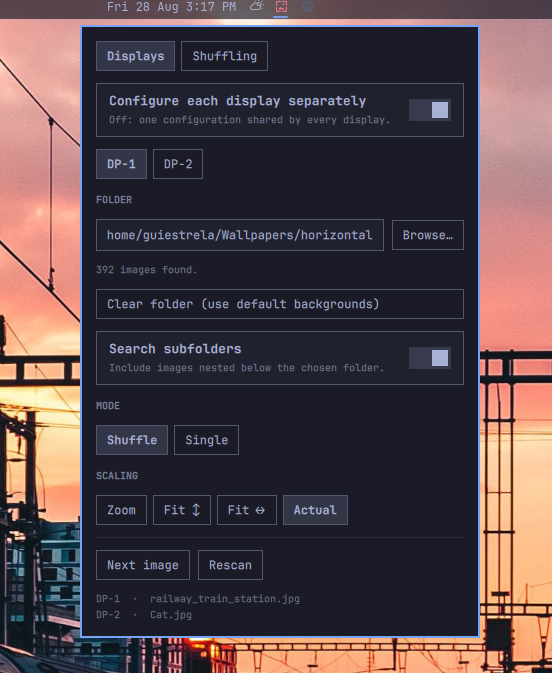
Click the wallpaper icon in the bar. Two tabs: Displays and Shuffling. Actions and what's on each screen stay visible below them.
Displays — per display, or shared by all of them:
| Setting | Default | Does |
|---|---|---|
| Configure each display separately | off | On: a tab per display. Off: one shared configuration. |
| Folder | empty | Where images come from. Empty = current theme backgrounds. Paths may use ~. |
| Search subfolders | on | Scan recursively. |
| Mode | Shuffle | Single pins one image, chosen from a thumbnail grid. |
| Scaling | Zoom | Zoom, Fit ↕, Fit ↔, or Actual. |
Shuffling — global:
| Setting | Default | Does |
|---|---|---|
| Auto-shuffle every | 0 |
Seconds. 0 is off. |
| Shuffle on unlock or wake | off | Shuffle on unlock or screensaver exit instead. |
| Different image per display | on | Off mirrors one image across displays sharing a folder. |
Mixing displays
Set one display to Single and another to Shuffle and you get exactly that: the pinned one never moves while the other rotates. Displays pointed at the same folder share a pool and a deal queue, so they never show the same image at once and still see every image before repeating; displays on different folders rotate independently.
The four scaling modes only differ when the image and the screen disagree about shape. A 3440×1440 wallpaper on a 3440×1440 screen looks identical under Zoom, Fit ↕ and Actual, because it is.
Next image
The pool is dealt from a shuffled queue that only reshuffles once it empties, so there is always a next image waiting rather than a fresh roll of the dice. Next image hands it out — to every display set to Shuffle, leaving the pinned ones alone. With every display pinned there is no next image and the button is not shown.
Middle-click the bar icon for the same thing. Hovering it shows a thumbnail of what each display is about to get.
Keys while the panel is open: n next image · r rescan · b browse
omarchy-shell background next           # next image (shuffle is an alias)
omarchy-shell background rescan         # re-read the folder
omarchy-shell background status         # JSON state

# hyprland bind
bind = SUPER SHIFT, W, exec, omarchy-shell -q background next
Compatibility
The plugin is designed for Omarchy Quattro and uses the shell's scoped public
plugin APIs. It was validated locally with Omarchy 4.0.3-1, Quickshell
0.3.1, and Qt 6.11.2.
After updating the plugin, restart the shell if the old widget or service is still running. In folder mode, changing the theme keeps the selected wallpaper while applying the new Omarchy colors; with no folder configured, the normal Omarchy background transition is preserved.
Requirements
Omarchy Quattro · Python 3 · zenity for the Browse button · Qt Multimedia
for video playback. Animated GIF playback uses Qt Quick's built-in
AnimatedImage support.
The runtime does not use the network. Settings are stored through Omarchy in
~/.config/omarchy; the service also updates Omarchy's current-wallpaper link
at ~/.local/state/omarchy/current/background so the lock screen can use it.
Link publication is descriptor-relative: the parent is opened without
following symlinks, ownership and write permissions are checked, and the
published symlink is revalidated after the atomic rename.
Theme and fonts
The plugin keeps Omarchy's theme behavior intact. In folder mode, changing the theme keeps the selected wallpaper but immediately applies the theme's color payload to the bar and settings panel. In the default mode, the normal Omarchy background transition is preserved.
Text uses Quickshell's Style.fontFamily and themed size tokens, so the widget
automatically follows the active Omarchy font and its accessibility sizing.
It does not bundle, download, or install fonts.
Technology
The plugin is built with QML for Quickshell and uses Qt Quick for the UI and
transitions, Qt Multimedia for video playback, and Omarchy's shell/IPC
interfaces for settings, theme changes, status, and the current-wallpaper
link. File discovery is performed by a bounded local find process; no
network service or background updater is included.
Security notes
Omarchy plugins run in the user's shell process and are not sandboxed. Only choose wallpaper folders containing files you trust: Qt Multimedia and the image decoders process the selected media. The plugin does not execute files from wallpaper folders, follow symlinks during scans, request elevated permissions, or use the network.
Folder paths are shell-quoted before scanning, control characters and paths over 4096 characters are rejected, scans stay on the selected filesystem, do not follow symlinks, descend at most 32 levels, stop after 10,000 entries, and time out after 15 seconds. The current-wallpaper link is published through an owner-checked, no-follow directory descriptor and revalidated after each publication. These limits reduce accidental resource exhaustion; they do not turn an Omarchy plugin into a sandbox.
Credits
Extends Omarchy's built-in omarchy.background
(basecamp/omarchy, MIT).
MIT — see LICENSE.