
OmaRecall
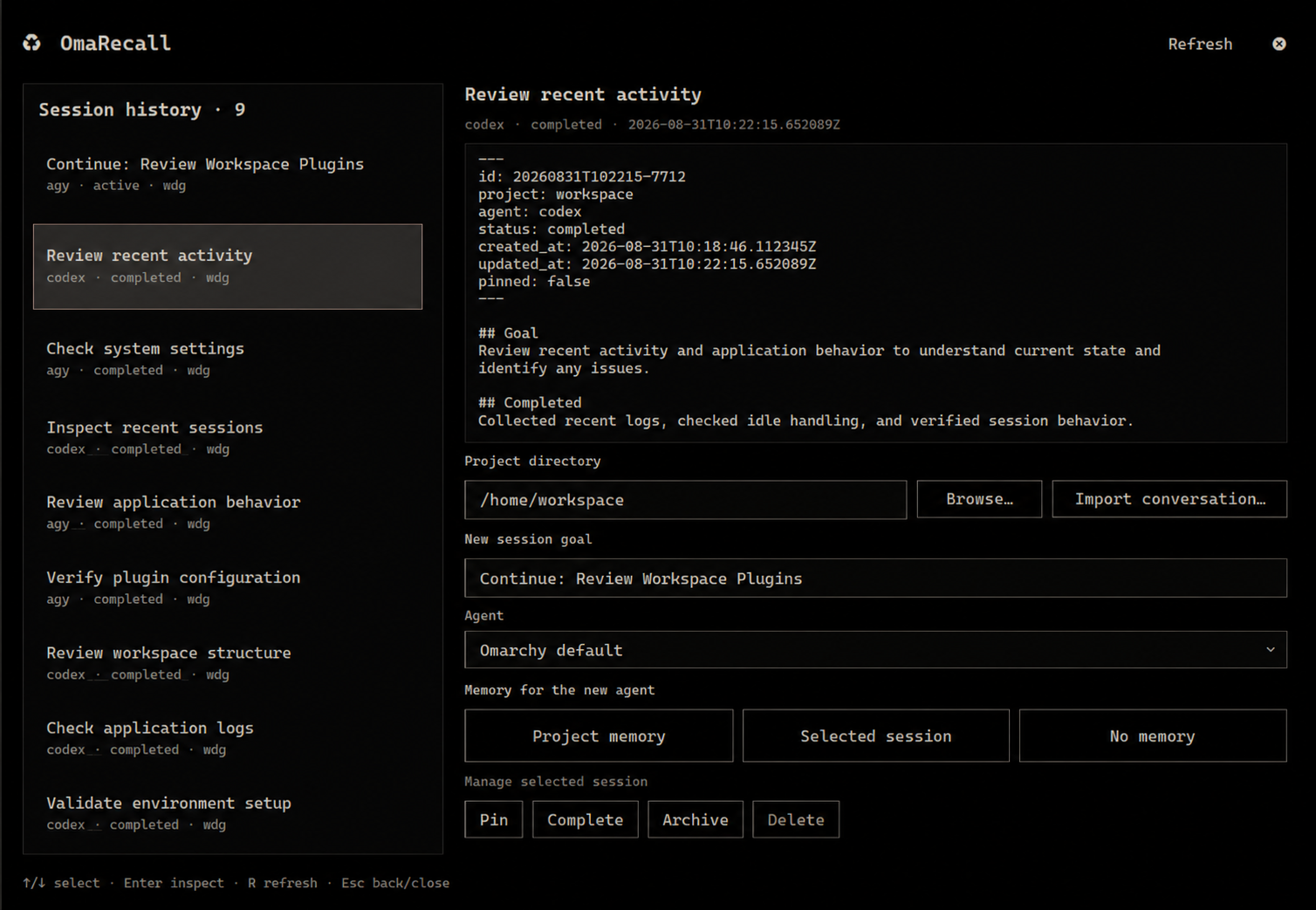
OmaRecall is a local, inspectable memory layer for AI agent sessions on Omarchy. It keeps structured session notes, lets you review exactly which memory will be recalled, and starts a new interactive agent with that context.
Features
- Scrollable session history in an Omarchy-native bar panel.
- Start with relevant project context, one selected session, or no memory.
- Import one external
.md,.txt, or supported.jsonconversation as a completed session attached to a chosen project. - Exact context preview with a fingerprint that prevents launch if the source changes after review.
- Interactive adapters for Claude, Codex, Copilot, Crush, Grok, Oh My Pi,
OpenCode, Pi, and Antigravity, plus an
omarchy-agentfallback for future default agents. - Agent checkpoint contract for goals, completed work, decisions, pending work, relevant files, and warnings.
- Pin, complete, archive, and explicitly confirmed delete actions.
- Local Markdown notes and rebuildable JSON indexes; no database or network.
- Secret redaction, private file permissions, atomic writes, and symlink/path traversal protection.
- Keyboard navigation and accessible labels throughout the panel.
Requirements
- Omarchy Desktop: Omarchy Linux environment with Omarchy Shell (Quickshell / Wayland).
- Python: Python 3.11 or higher (standard library only; no external
pippackages required). - Omarchy Core Utilities:
omarchy-shell(panel lifecycle and IPC)omarchy-launch-tui(interactive terminal wrapper)omarchy-file-select(native directory & conversation file picker)omarchy-default-agent(default agent resolver)
- Supported AI Agent CLIs (optional, at least one to launch sessions):
- Claude (
claude), Codex (codex), GitHub Copilot (copilot), Crush (crush), Grok (grok), Oh My Pi (omp), OpenCode (opencode), Pi (pi), or Antigravity (agy).
- Claude (
Install
From a published Git repository:
omarchy plugin add https://github.com/wisangdg/omarecall.git --enable
For local development, commit the checkout and pass its absolute path to
omarchy plugin add.
Open the panel from its bar icon or with:
omarchy-shell shell toggle wdg.omarecall
Uninstall
To remove the plugin:
omarchy plugin remove wdg.omarecall
Session data in ${XDG_DATA_HOME:-~/.local/share}/omarecall/ is preserved. To remove stored session history as well, delete that directory manually.
How launch works
- Select a previous session, or enter a project path for a clean start.
- Enter the goal and choose Omarchy default or one of the nine explicit agent adapters.
- Review relevant project memory, one session, or a clean-session notice.
- Start the agent. OmaRecall creates a new session and gives the agent a checkpoint command.
The project field starts at the current user's home directory. Set
OMARECALL_DEFAULT_PROJECT before starting Omarchy Shell to use a different
portable default; a selected session's project path takes precedence.
The recalled packet is stored as a private file beside the new session. Only a short instruction and that file path appear in the agent process arguments; the recalled memory itself is not placed in the process list.
Omarchy default follows the agent selected by omarchy-default-agent. A
known agent uses OmaRecall's direct adapter; a future unknown default is passed
to omarchy-agent --inline --prompt. Explicit unknown agent names are rejected.
Agent CLIs are not bundled with the plugin and must be installed and configured
separately. Locally deprecated agent identities are rejected before fallback.
Importing an external conversation
Choose the project that the conversation belongs to, then select Import conversation…. Each file becomes one completed session and can immediately be previewed with This session or included through Relevant project.
Markdown and plain text are the dependable interchange formats. JSON import is
best-effort for one generic messages conversation, a ChatGPT mapping
conversation, or Claude chat_messages. A full export containing multiple
conversations is rejected instead of silently mixing unrelated chats into one
project. Files must be UTF-8 regular files, cannot be symlinks, and are limited
to 2 MiB.
Storage
Session data defaults to:
${XDG_DATA_HOME:-~/.local/share}/omarecall/
├── .store.lock
├── projects.json
├── index.json
└── projects/<project-id>/sessions/<session-id>/
    ├── meta.json
    ├── note.md
    ├── import.md   # only for explicitly imported conversations
    └── context.md  # only for launches with recalled memory
Directories use mode 0700 and files use 0600. index.json is a cache and
can be recreated with omarecall reindex. Uninstalling the plugin never removes
session data automatically. The persistent .store.lock serializes complete
store operations across CLI processes; it must not be replaced or removed while
OmaRecall is running.
Raw transcripts are stored only when the user explicitly imports them. OmaRecall does not automatically capture sessions started elsewhere.
CLI
./bin/omarecall session list --limit 100
./bin/omarecall session show SESSION_ID
./bin/omarecall checkpoint SESSION_ID --completed "Implemented storage"
./bin/omarecall checkpoint SESSION_ID --resolve-pending "Add context builder"
./bin/omarecall checkpoint SESSION_ID --remove-pending "Obsolete task"
./bin/omarecall import --file conversation.md --project "$PWD"
./bin/omarecall context build --mode session --session-id SESSION_ID
./bin/omarecall context build --mode relevant --project "$PWD"
./bin/omarecall launch --agent codex --project "$PWD" \
  --goal "Continue the work" --mode session --session-id SESSION_ID
./bin/omarecall launch --project "$PWD" --goal "Use my Omarchy default" \
  --mode clean
Every successful command prints JSON to stdout. Expected errors print a stable JSON error object to stderr and exit with status 2.
Use --resolve-pending to move a finished item from Pending to Completed, or
--remove-pending to drop work that is no longer needed. Both flags can be
repeated and match the full item text, ignoring leading and trailing whitespace.
Missing items are ignored, so retrying a checkpoint does not duplicate completed
work. When combined with --pending, additions happen first; resolution and
removal then apply to the resulting list. Resolution takes precedence if both
flags name the same item. These operations affect only the specified session.
Refreshing panel history preserves the selected session even when checkpoints, pinning, or status changes reorder the list. A successful import or launch selects the newly created session.
Project memory uses the project directory entered in the panel for both preview
and launch. It does not require selecting an existing session. The CLI accepts
either --project or --project-id for relevant context.
Newly written notes use note_format: 2 in their frontmatter and indent multiline
continuations so Markdown headings and blank lines remain part of the same item.
Existing notes remain readable and are upgraded when updated. Content already
lost by an earlier rewrite cannot be recovered automatically.
The context budget includes the memory envelope and truncation marker. Token counts are estimates based on four characters per token, not model tokenization.
Development
The runtime uses only the Python standard library.
Node.js is optional for development; when available, the test suite also runs panel JavaScript behavior tests. These do not replace testing the live QML UI.
PYTHONPATH=src python3 -m unittest discover -s tests -v
python3 -m compileall -q src tests
omarchy plugin validate .
qmlformat -n BarWidget.qml >/dev/null
qmlformat -n Panel.qml >/dev/null
License
MIT © 2026 wdg