
Better Emojis for Omarchy
A drop-in replacement for the built-in Omarchy emoji picker (Super + Ctrl + E)
with category tabs, recents, skin tones, gender variants, and adjustable sizing.
Designed to adhere to Omarchy conventions — fully keyboard-accessible, Nerd
Fonts icons for categories, and instant open/close with no lag.
Install
omarchy plugin add https://github.com/Wessel-Boers/omarchy-better-emojis.git --enable
That's it. The plugin registers itself as the implementation behind
omarchy.emojis, so your existing Super + Ctrl + E binding opens it and the
stock picker is disabled automatically. Removing the plugin restores the stock
picker:
omarchy plugin remove wessel.better-emojis
Features
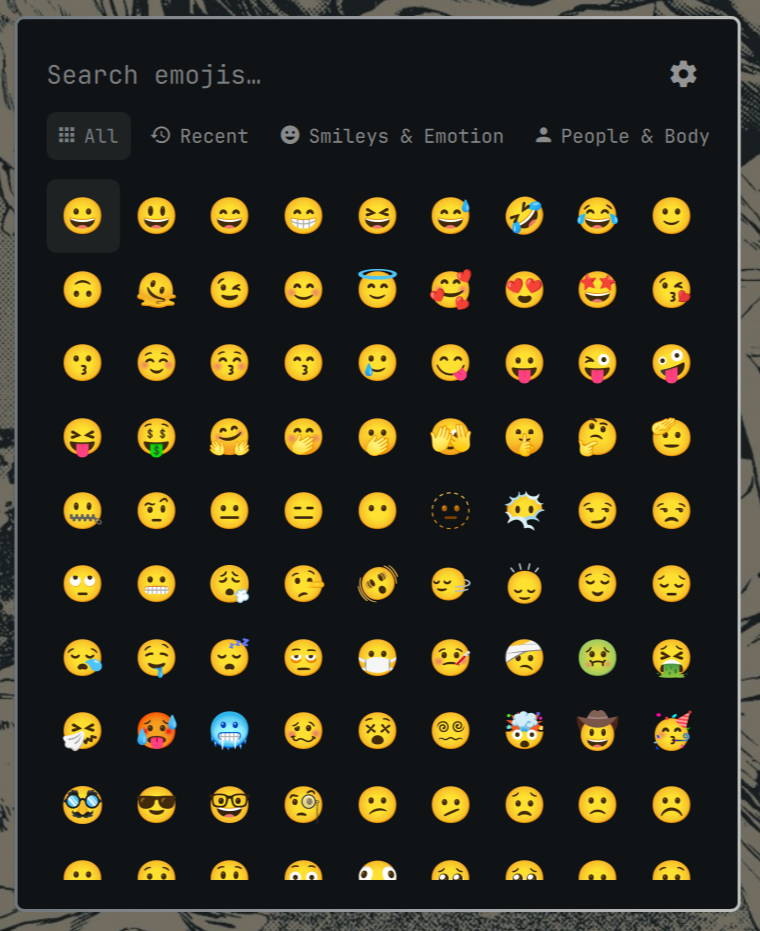
- Category tabs — All, Recent, Smileys & Emotion, People & Body, Animals & Nature, Food & Drink, Activities, Travel & Places, Objects, Symbols, Flags. Searching always searches every category with multi-word AND matching.
- Recents — the last inserted emojis are remembered and available from the Recent tab.
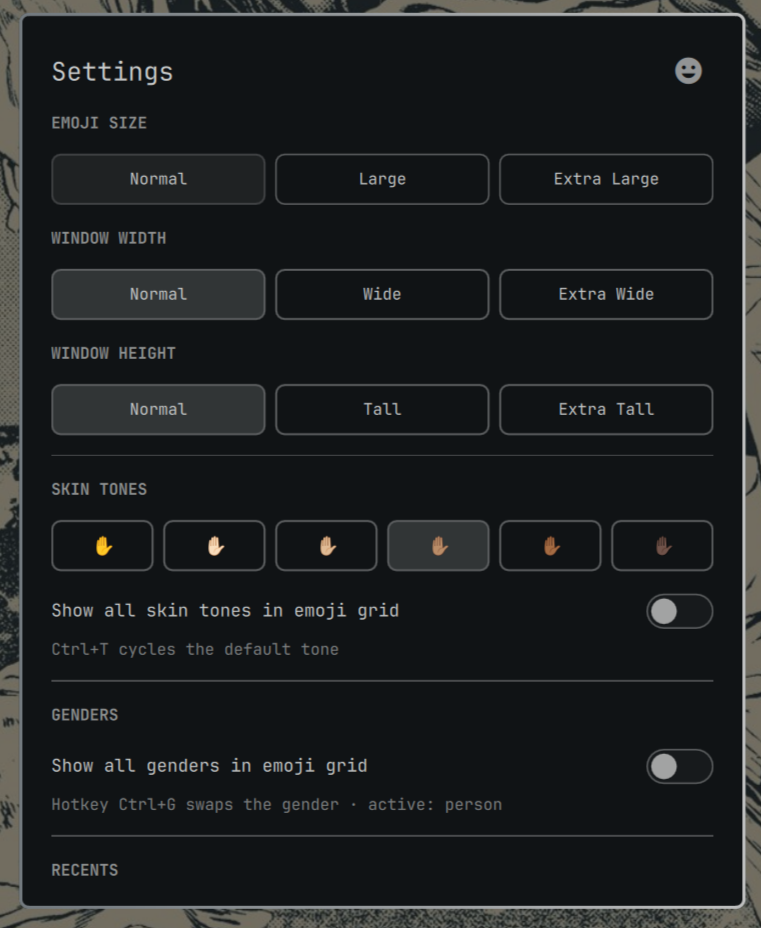
- Skin tones — choose a default tone in Settings or show all five exact Unicode tone variants beside each base emoji. Cycle through with a hotkey. The grid never shows duplicate standalone tone variants.
- Gender variants — man, woman, and variants are combined by default. Cycle through with a hotkey or enable all gender variants in Settings when you want them shown separately.
- Settings page — the gear switches the overlay from the emoji grid to a dedicated Settings page. The emoji icon returns to the grid.
- Preset sizing — emoji size (Normal / Large / Extra Large), window width (Normal / Wide / Extra Wide), and window height (Normal / Tall / Extra Tall). Grid columns distribute evenly across the complete overlay width at every size.
- Keyboard navigation — Tab to different categories and access the settings menu with a hotkey. Settings itself uses group-level navigation: Tab and Shift+Tab move between groups, Up and Down move between groups, and Left and Right select options within the active group.
- Copy mode —
Ctrl + Entercopies instead of typing into the focused app. - Theme aware — uses Omarchy menu tokens,
Button,Toggle, andPanelSeparatorcomponents. Toggle shapes follow system corner roundedness. - Nerd Font navigation icons — category tabs and view navigation use the same Nerd Font icon style as the Omarchy bar.
- 1,914 emojis — generated from Unicode emoji-test.txt with CLDR names and keywords (Emoji 17-era data), ordered exactly like every other platform.
Keyboard shortcuts
| Key | Action |
|---|---|
| type | Search all categories |
Tab / Shift + Tab |
Next / previous category tab |
Ctrl + 1 … Ctrl + 9 |
Jump to tab N |
Ctrl + T |
Cycle skin tone |
Ctrl + G |
Cycle displayed gender when genders are combined |
Ctrl + S or Ctrl + , |
Open Settings / return to emojis |
| arrows / PgUp / PgDn | Move the emoji cursor |
Enter |
Insert selected emoji |
Ctrl + Enter |
Copy selected emoji |
Esc |
Clear search text in emoji view; dismiss the overlay from Settings |
Navigate the Settings menu with Tabs or arrows to selected options with the keyboard.
Settings
Settings persist in
~/.local/state/omarchy/plugins/wessel.better-emojis/settings.json
(deliberately outside the plugin folder so omarchy plugin update stays a clean
fast-forward): emoji size, window width/height, chosen skin tone, recent
emojis, skin-tone display, gender display mode and visibility. The picker
remembers the last open category, including All and Recent.
Settings include:
- Emoji size: Normal, Large, Extra Large
- Window width: Normal, Wide, Extra Wide
- Window height: Normal, Tall, Extra Tall
- Default skin tone and the all-tones grid toggle
- All-genders grid toggle, off by default so genders are combined
- Show Recent tab and Clear recent emojis
How it works
The manifest carries "omarchy": { "clonedFrom": "omarchy.emojis" }. The shell
routes every call made to the built-in omarchy.emojis id — including the
Super + Ctrl + E binding — to the enabled plugin that claims it, and disables
the stock picker while this one is enabled. It's the same mechanism
omarchy plugin clone uses, shipped as a standalone plugin.
Development
Regenerate the emoji dataset (requires network):
python3 tools/generate_emoji_data.py
Validate the manifest the same way the shell does:
omarchy plugin validate .
For local testing, symlink or copy the repo into
~/.config/omarchy/plugins/wessel.better-emojis/, run
omarchy plugin enable wessel.better-emojis, then hit Super + Ctrl + E.
Edits under ~/.config/omarchy/plugins/ hot-reload.
License
MIT