
white.nights
An Omarchy shell plugin that blocks suspend and hibernate while leaving your normal idle cycle untouched: the screen still goes to the screensaver, locks, and turns off — the system just stays on underneath.
A white night is a summer night when the sun barely dips below the horizon and it never gets fully dark. Your machine stays awake all night, screen off.
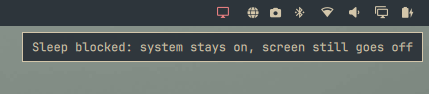
What it does
- Keeps the screensaver, lock, and display-off behavior exactly as configured
(
idle.screensaver/idle.lockin~/.config/omarchy/shell.json). - Holds a
systemd-inhibit --mode=blockonsleep,handle-lid-switch,handle-suspend-key, andhandle-hibernate-keywhile enabled, so suspend, hibernate, and lid-close sleep are refused. - Shows a bar toggle to flip it on and off whenever you like. The enabled state persists across reboots.
Perfect for downloads, rendering, servers, or leaving the machine on overnight without the screen burning.
Requirements
- Omarchy (with the Quickshell-based shell and idle/lock plugins)
systemd-inhibit(part of systemd, always present)
Installation
Install straight from this repository with the Omarchy plugin installer. The
command clones the repo into ~/.config/omarchy/plugins/, validates the
manifest, and (with --enable) places the toggle in your bar:
omarchy plugin install https://github.com/nightdevil00/white.nights --enable
omarchy plugin install is an alias for omarchy plugin add.
If you would rather add it without enabling it right away, drop --enable:
omarchy plugin install https://github.com/nightdevil00/white.nights
# then, when you're ready:
omarchy plugin enable white.nights
The first time you enable it, sleep blocking is off. Turn it on with the bar
icon or omarchy-shell no-sleep enable.
Usage
Click the monitor icon () in the bar to toggle sleep blocking. When active
the icon is highlighted and tooltips explain the state.
You can also control it from a terminal:
omarchy-shell no-sleep status      # current state
omarchy-shell no-sleep enable      # block suspend/hibernate
omarchy-shell no-sleep disable     # allow suspend/hibernate again
omarchy-shell no-sleep toggle      # flip the state
Verify the inhibitor is live with:
systemd-inhibit --list
# No Sleep (white.nights) ... mode=block
How it works
The plugin is a service + bar-widget pair:
Service.qmlkeeps a long-runningsystemd-inhibitprocess that holds a block inhibitor while the service is enabled. logind refuses every sleep request (suspend, hibernate, suspend-then-hibernate, hybrid) and ignores the lid/suspend keys while it is held. The state is persisted in~/.local/state/omarchy/indicators/white.nights.BarWidget.qmlis the bar toggle that talks to the service.
Because sleep is blocked, logind never enters sleep, so Omarchy's pre-suspend
lock (omarchy-sleep-lock.service) simply never fires — there is nothing to
lock before. The screen still blanks through the normal idle → screensaver →
lock path.
Notes
- While enabled,
systemctl suspendand friends fail with "Operation inhibited". That is the point — disable it when you actually want to sleep. - The block only lasts while the Omarchy shell is running. If you log out, the inhibitor is released and sleep behaves normally again.
Uninstall
omarchy plugin remove white.nights