
Screen Zoom for Omarchy
A topbar widget that magnifies your entire screen in smooth steps, centered on your mouse cursor. Handy for presentations, reading small text, pixel work, or accessibility.
Powered by Hyprland's native cursor:zoom_factor engine — no external
magnifier tools, no re-compositing, instant and smooth.
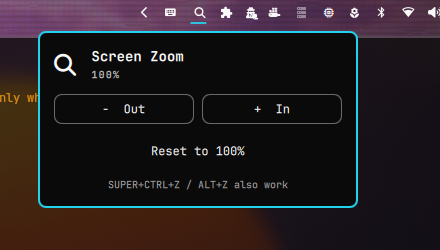
Features
- Magnifier icon in the topbar — shows the current zoom percentage while
zoomed (e.g.
125%), a glyph at 100% - Click to open controls — big
− Out/+ Inbuttons, a live percentage readout, and one-clickReset to 100% - Smooth 25% steps by default (configurable), clamped to a 400% maximum
- Stays in sync — zoom with your keyboard (
SUPER+CTRL+Z) and the widget label follows along within two seconds - Works everywhere: zoom follows your cursor across all monitors
- IPC scriptable (opt-in): enable Allow IPC commands to drive zoom from
scripts and keybinds —
omarchy-shell wisdom.screen-zoom zoomIn|zoomOut|reset|toggle
Requirements
- Omarchy Quattro (or any Omarchy with the Quickshell-based shell)
- Hyprland 0.56+ for the modern Lua config bridge. Older Hyprland versions are
auto-detected and served via the legacy
hyprctl keywordpath.
Install
omarchy plugin add https://github.com/chuma-beep/omarchy-screen-zoom.git
Then add the Screen Zoom widget to your bar when prompted (defaults to the
right section), or move it later with omarchy bar move wisdom.screen-zoom --section right.
Usage
| Action | How |
|---|---|
| Zoom in / out | Click the icon, use + In / − Out |
| Reset to 100% | Click Reset to 100% |
| Keyboard (built-in Omarchy binds) | SUPER+CTRL+Z in, SUPER+CTRL+ALT+Z reset |
| Script / keybind | Enable Allow IPC commands first, then omarchy-shell wisdom.screen-zoom zoomIn (also zoomOut, reset; open, close, toggle always manage the popup) |
Configuration
Right-click the widget in your bar (or open Setup → Plugins → Screen Zoom) to configure:
| Setting | Default | Description |
|---|---|---|
| Step size (%) | 25 | How much each click changes magnification (5–100) |
| Maximum zoom (%) | 400 | Upper clamp for + and zoomIn (150–800) |
| Bar icon | Nerd Font glyph shown at 100% zoom | |
| Allow IPC commands | Off | Lets scripts and keybinds change zoom via omarchy-shell. While on, any local process can invoke these commands. |
How it works
The widget talks directly to the Hyprland compositor (cursor:zoom_factor)
using the IPC instance it discovers at startup — including sessions where
HYPRLAND_INSTANCE_SIGNATURE isn't propagated to the shell (common under
uwsm). On Hyprland 0.56+ it uses the Lua config bridge; older versions get the
legacy keyword command automatically.
Security notes
Zoom changes coming from outside the widget (scripts, keybinds) are disabled by default. Shell IPC is reachable by every process running as your user, so enable Allow IPC commands only if you want scripted control of the zoom factor. The widget's own buttons and popup never require the opt-in.
License
MIT © chuma-beep