
Omarchy Wallpapers
A wallpaper browser in the Omarchy bar. Draw a random photo from the collections you pick, set it as your wallpaper. An Omarchy shell plugin, powered by Unsplash.
Not affiliated with or endorsed by Unsplash. The API guidelines forbid using their name in an application name or their logo as an app icon, so this is "Omarchy Wallpapers"; every photo credits its photographer and Unsplash, both linked.
Drawing and applying are separate — click the photo as often as you like; nothing reaches your desktop until you press Set as wallpaper.
Requirements
Omarchy 4 (the Quickshell-based shell). Beyond that it shells out to a handful of commands, all standard on an Omarchy install:
curl |
API requests and photo downloads |
jq |
reading and writing the JSON config, history, and lookups |
xdg-open |
opening a photo or photographer on unsplash.com |
omarchy-theme-bg-set |
applying the wallpaper (ships with Omarchy) |
omarchy-notification-send |
the "wallpaper set" toast; falls back to notify-send, and is skipped if neither exists |
identify (ImageMagick) |
optional — sanity-checks that a download decoded as an image; skipped when not installed |
No other runtime, package, or network service is required, and nothing is installed on your behalf.
Install
omarchy plugin add https://github.com/wolfgangrittner/omarchy-wallpapers.git --enable --yes
Then add an access key (below).
Uninstall: omarchy plugin remove wolfgangrittner.omarchy-wallpapers
Access key
The API needs a free key of your own — there is no unauthenticated endpoint.
- Go to https://unsplash.com/oauth/applications and sign in, creating an Unsplash account if you need one.
- New Application. Accept the API terms and guidelines, then give it any name and description — the key is yours, nothing is reviewed or published.
- Copy the Access Key from the application page. Not the Secret key — this app never needs it.
- In the panel, open settings (⚙), paste it in, press Save.
New applications run in Demo mode: 50 requests an hour. Only calls to
api.unsplash.com count; the photos themselves come from images.unsplash.com
and are free.
| Action | Requests |
|---|---|
| Curated grid discovery | 6, once ever — cached in config |
| New photo | 1 |
| Set as wallpaper | 1 — the download ping the guidelines require |
| Collection search | 1 — the default browse list caches for 30 minutes |
A draw-and-set cycle is 2, so roughly 25 wallpaper changes an hour. If you do spend the hour, the panel says so and leaves the desktop alone: your wallpaper, History, and re-applying an old photo keep working, because those come from the image CDN. Only new draws and searches wait for the reset.
Apply for Production in the same dashboard raises the limit to 1,000/hour; nothing here needs to change.
Panes
| Home | Collections | History |
|---|---|---|
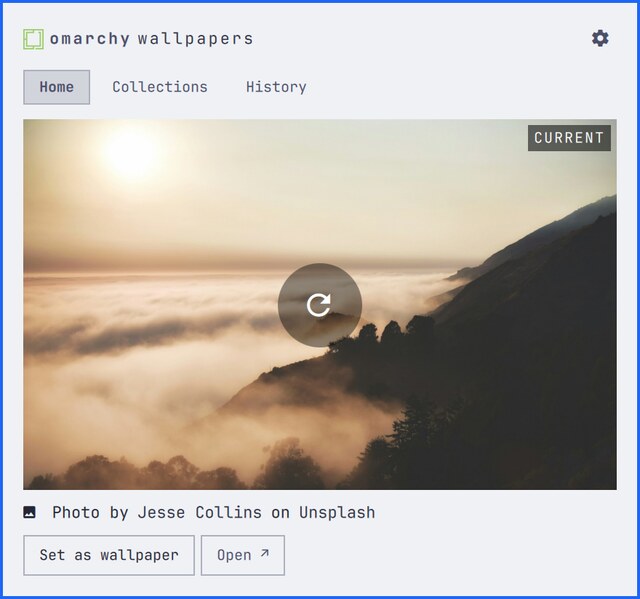 |
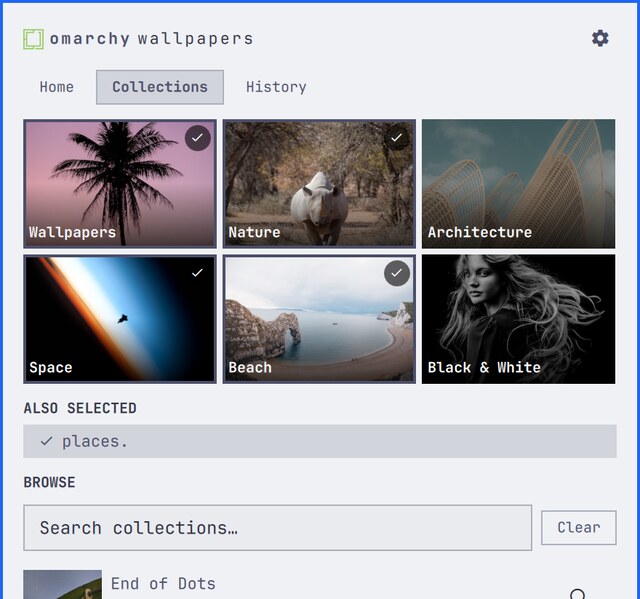 |
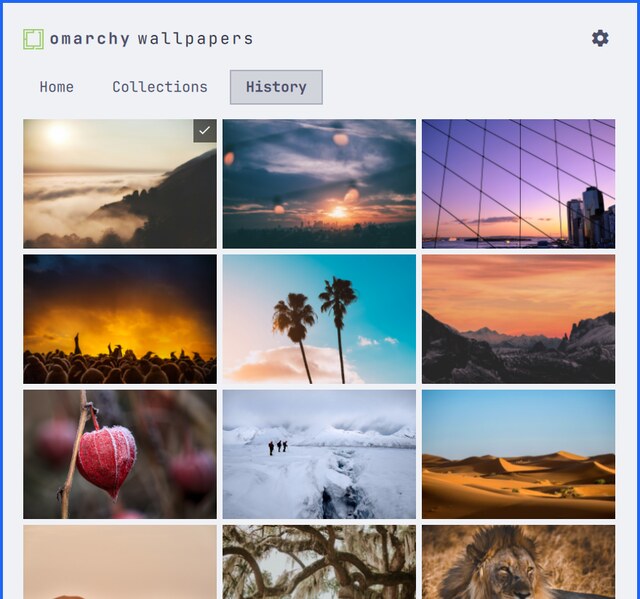 |
| The photo on show. Click it — or the ⟳ over it — to draw another; Set as wallpaper applies it and closes the panel. | Six curated collections in a 3×2 grid, plus search for any other public collection. Tick any mix; Wallpapers is on out of the box, and unticking everything draws from all of Unsplash. | Every photo shown, applied or not. Click one to set it again. |
Mouse
| Left-click icon | Open/close |
| Right-click icon | Open and draw a photo |
| Click photo | Draw another |
| Click a collection | Select/deselect as a source |
| Click history thumb | Set it, close |
| Right-click history thumb | Open on unsplash.com |
Keys
1 2 3 |
Home / Collections / History |
n |
Draw a photo |
Enter |
Apply and close (Collections: toggle) |
←↓↑→ hjkl |
Move cursor |
/ |
Search collections |
r |
Reload collections |
o |
Open on unsplash.com |
Esc |
Close |
Config
bin/ow-config set <key> <value> · setstdin <key> · unset <key>... · get
| Key | Default | |
|---|---|---|
orientation |
landscape |
landscape, portrait, squarish (also a button in ⚙) |
keep |
10 |
Downloaded wallpapers to keep |
historyMax |
200 |
History entries to keep |
minPhotos |
10 |
Hide collections offering fewer usable photos than this |
curated |
discovered | The six grid collections. Resolved on first run, cached here. Rebuild from ⚙. |
collections |
Wallpapers | Which collections photos are drawn from |
The curated grid
Collection ids are never hardcoded. On first run bin/ow-curated searches
Unsplash for each of the six names and keeps the largest match, counted in
photos a free API key can actually fetch — total_photos minus total_plus.
That last part matters: the biggest "wallpapers" collection is entirely
Unsplash+ premium, and /photos/random answers 404 for it, so ranking on the
raw count picks a collection that silently returns nothing. It prefers
collections with at least 50 usable photos, falling back to the largest usable
one so a thin search term still yields a tile. Results are cached in curated;
Rebuild curated in ⚙ re-runs the lookup.
The same count drives the browse list: collections with fewer than minPhotos
fetchable photos are hidden, which removes Unsplash+ collections (0 usable) and
near-empty ones in a single rule. The pane says how many it hid.
Config lives in ~/.local/state/omarchy/settings/omarchy-wallpapers.json (mode
0600) — outside ~/.config so the access key stays out of dotfiles repos.
Two more live on the bar widget itself in ~/.config/omarchy/shell.json, since
they are layout rather than behaviour: columns (history/curated grid width,
default 3) and perPage (collection search results, default 20).
Files
Wallpapers download at your screen's native width to
~/.config/omarchy/backgrounds/<theme>/unsplash-<id>.jpg, so omarchy theme bg next cycles them too. Only photos you apply are downloaded. The keep newest
are kept; older unsplash-*.jpg in that directory are deleted, nothing else.
State, all in ~/.local/state/omarchy/settings/:
omarchy-wallpapers.json          key, orientation, collections, curated, limits
omarchy-wallpapers-current.json  photo currently applied
omarchy-wallpapers-history.json  every photo shown
Source:
Panel.qml              bar button + three-pane popup
CuratedCell.qml        one tile in the curated grid
SourceRow.qml          one row in the search/browse list
Model.js               endpoints, parsing, config, grid math
bin/ow-api             authenticated Unsplash requests
bin/ow-lib.sh          shared checks on ids and URLs
bin/ow-config          read/write config
bin/ow-curated         resolve the six curated collections
bin/ow-history         record photos shown
bin/ow-set-wallpaper   download, apply, prune
Handling the access key and remote input
The access key is never passed as a command-line argument, because
/proc/<pid>/cmdline is world-readable and would expose it to every process on
the machine for the life of the request. bin/ow-api reads the key from the
config itself and hands it to curl in a config file on stdin; the panel calls
ow-api with only a request path, so no caller can aim a credentialed request
at another host. Saving the key from ⚙ goes over stdin too
(ow-config setstdin). Redirects are never followed on a request carrying the
key, so a 302 cannot replay it elsewhere.
Ids and URLs in an API response are treated as untrusted: a photo id has to
match [A-Za-z0-9_-]{1,128} before it becomes a filename, image downloads must
be https from images.unsplash.com or plus.unsplash.com, the download ping
must be api.unsplash.com, and anything handed to xdg-open must be
unsplash.com. The rules live in Model.js for the panel and bin/ow-lib.sh
for the scripts, so each holds even when a script is run on its own. History
rows are re-checked when read back, not trusted for having come off local disk.
IPC
omarchy-shell wallpapers toggle|open|close
omarchy-shell wallpapers next          # draw a photo
omarchy-shell wallpapers set           # apply the one on show
omarchy-shell wallpapers showPane home|collections|history
Bind in ~/.config/hypr/bindings.lua:
o.bind("SUPER CTRL", "U", "omarchy-shell wallpapers toggle")
next then set on a systemd timer gives you rotation.
Attribution
Every photo credits its photographer and Unsplash, both linked with the
required utm_source/utm_medium referral parameters; images are hotlinked
from the API's own URLs, and the download endpoint is pinged on apply — per the
Unsplash API Guidelines.
License
MIT