
Lull
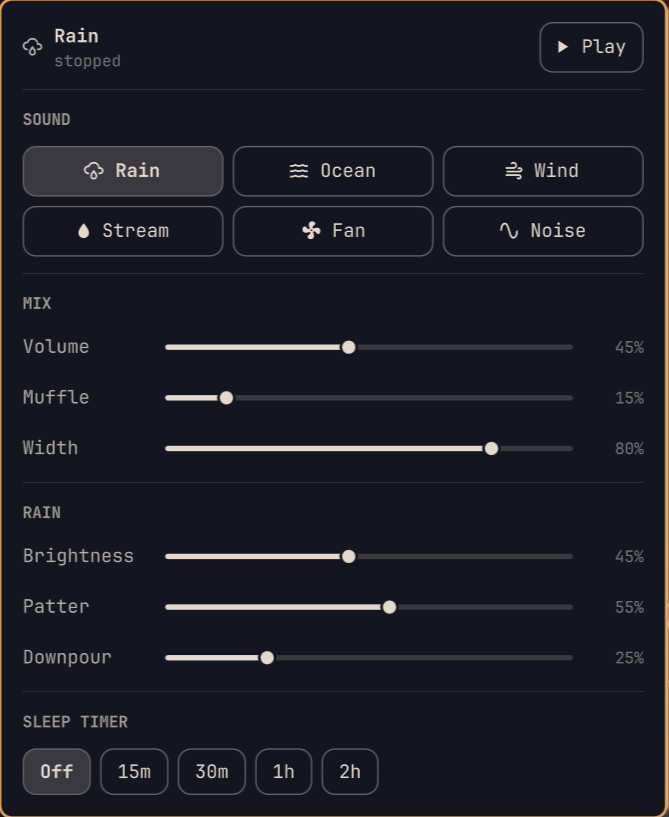
Background noise for Omarchy, generated live in the bar. Rain, ocean, wind, a stream, a fan, and plain white/pink/brown noise — each with sliders to dial it in.
There are no sound files. Every sound is synthesised from shaped noise as it plays, which is why the whole plugin is a few hundred kilobytes and why the sliders change the sound instantly instead of crossfading between loops.
Install
Review the repository, then add the plugin:
omarchy plugin add https://github.com/WyattB111/omarchy-lull.git
Accept the prompt to enable the plugin during installation.
For an unattended install from a repository you already trust:
omarchy plugin add https://github.com/WyattB111/omarchy-lull.git --enable --yes
Requirements
python-numpy— the synthesiser will not start without it. Install thepython-numpypackage before enabling the plugin. (Lull never installs anything itself; it only tells you when the package is missing.)- PipeWire (
pw-cat), which Omarchy already ships.paplayis used as a fallback ifpw-catis missing.
Using it
The widget lands in the right-hand section of the bar.
| Action | What it does |
|---|---|
| Left click | Open the mixer |
| Right click | Start / stop |
| Middle click | Next sound |
| Scroll | Volume |
Every sound keeps its own slider positions, so switching from Rain to Ocean and back returns the rain you had tuned. Muffle rolls the top end off everything (good for "through a wall"), Width sets how wide the stereo image is, and the sleep timer fades out over its last 90 seconds rather than cutting.
Optional keybindings
Keybindings stay user-owned. Add these to ~/.config/hypr/bindings.lua if you
want them:
o.bind("SUPER + N",       "Lull mixer",       "omarchy-shell wyatt.lull mixer")
o.bind("SUPER + ALT + N", "Lull: toggle",     "omarchy-shell wyatt.lull toggle")
o.bind("SUPER + ALT + M", "Lull: next sound", "omarchy-shell wyatt.lull next")
The IPC endpoints are mixer, toggle, next, prev, louder, quieter.
From a terminal
The bundled engine is also a CLI, and it shares state with the bar live in both directions:
lull on|off|toggle
lull mode ocean
lull set volume=0.4 surf=0.8
lull sleep 30
lull status
It lives at ~/.config/omarchy/plugins/wyatt.lull/bin/lull. Symlink it
onto your PATH if you want the short command:
ln -s ~/.config/omarchy/plugins/wyatt.lull/bin/lull ~/.local/bin/lull
What it does on your system
- Runs a background process.
bin/lull daemon, started on demand and exiting with your session. It holds the audio stream so sound survives a shell reload. Idle when stopped; roughly 1.5% of one core and ~40 MB while playing. - Executes
pw-cat(orpaplay) to play audio, andpython3to run itself. - Writes
~/.config/lull/config.json— your slider positions. Nothing else on disk is touched. - Listens on a unix socket at
$XDG_RUNTIME_DIR/lull.sock, used by the bar widget and the CLI. It is not a network socket. - No network access at all.
- Never starts playing on its own. Playback state is deliberately not restored, so a reboot is silent.
How the sound is made
Each 21 ms the engine draws a frame of random noise, multiplies it by a target spectral shape, inverse-FFTs it, and overlap-adds it with a square-root Hann window. That window sums to constant power at 50% overlap, so changing the shape between frames is a free crossfade — which is what lets you drag a slider mid-playback without hearing a click.
Rain and surf are then a matter of choosing the right shape and moving it: ocean gets a slow swell envelope that also opens the filter at the crest (so the foam arrives with the wave), wind gets a wandering resonance, and rain gets a layer of individually synthesised droplets sprinkled by a Poisson process, which is what turns hiss into rain.
Update
omarchy plugin update wyatt.lull
Remove
omarchy plugin remove wyatt.lull
That stops the widget and deletes the plugin. Your saved slider positions and the optional symlink are left behind deliberately; remove them yourself if you want nothing left:
rm -rf ~/.config/lull
rm -f ~/.local/bin/lull
Any keybindings you added to ~/.config/hypr/bindings.lua are yours to delete —
the plugin never edits that file.
Validate from source
omarchy plugin validate .
Security
This plugin runs unsandboxed inside omarchy-shell when enabled, and it starts a
background Python process. Review its source and the documented command, file,
and socket behaviour before installing it.
License
MIT — see LICENSE.