
Flipper Companion
A local-first Flipper Zero bar widget for Omarchy Shell. It shows USB/DFU presence without taking control of the serial port, exposes an explicit deep telemetry refresh, launches a real serial CLI, and provides safe firmware and file-vault shortcuts.
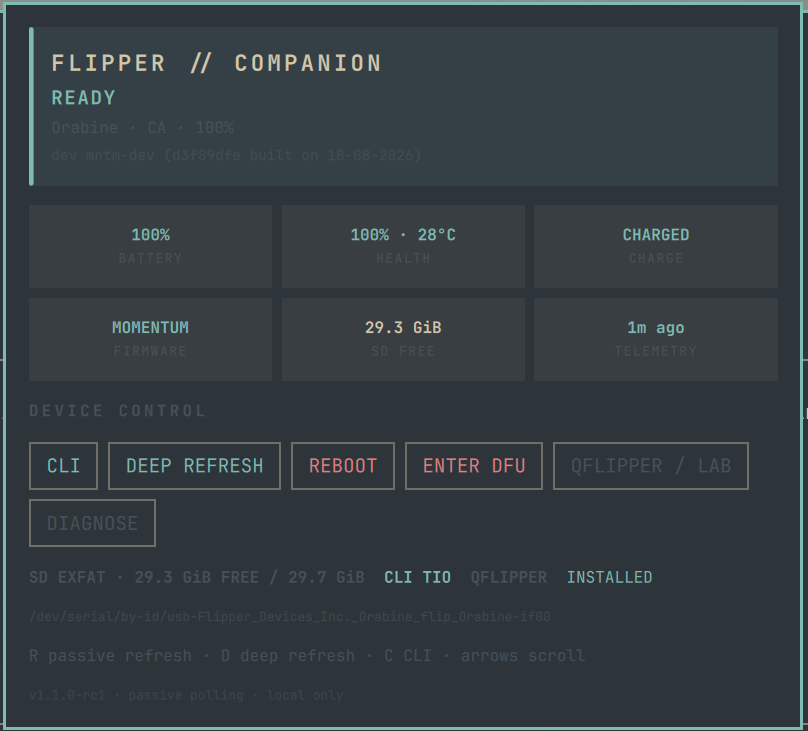
Install
Publish this directory as the root of a Git repository, then install it with:
omarchy plugin add https://github.com/DegenApeDev/flipper-omarchy.git --enable
For local development, copy this directory to
~/.config/omarchy/plugins/xyz.degendev.flipper/ and enable it with
omarchy plugin enable xyz.degendev.flipper. The helper ships inside the
plugin; no files outside the plugin directory are required.
Required: Bash, Python 3, jq, util-linux (flock), usbutils (lsusb). A serial
terminal is selected in this order: tio, picocom, screen, minicom.
qFlipper is optional. dfu-util is optional and enables the panel's Exit DFU action.
The helper uses the official 230400 baud rate and documented info device,
info power, storage info /ext, power reboot, and power reboot2dfu
commands. It never exposes arbitrary command execution through the panel.
Telemetry uses Python's standard-library termios and select modules; no
third-party Python packages are installed or imported.
Use
- Click the bar widget to open the dashboard.
- Refresh (
R) checks USB presence without opening the serial device. - Deep Refresh (
D) briefly reads device, power, and SD information. - CLI (
C) opens the first available supported serial client. - Reboot and Enter DFU require a second click within four seconds.
- While DFU is active, Reboot becomes Exit DFU and also requires confirmation.
- qFlipper / Lab opens the installed application or the official Web Serial fallback.
The panel identifies permission failures and the application currently holding the port. Close qFlipper or another serial client before a deep refresh.
For a non-interactive readiness check, run ./flipper-companion cli-check.
It verifies the device node, permissions, port ownership, terminal, client, and
official 230400 baud rate without opening or writing to the serial port.
socat is intentionally not used for interactive CLI sessions: behavior
varies across PTY builds and can leave users with a blank terminal. tio is
the recommended Linux client.
CLI shows a prompt but ignores commands
If picocom receives the Flipper greeting and prompt but the firmware ignores all keyboard commands, reboot the Flipper normally and reconnect USB. Use Main Menu → Settings → Power → Reboot → Reboot Flipper, or hold Left + Back for five seconds. This resets the device CLI subsystem; reinstalling the Omarchy plugin or changing Linux permissions will not help that state.
Upgrade and remove
Plugins installed from Git are managed by Omarchy:
omarchy plugin remove xyz.degendev.flipper
omarchy plugin add https://github.com/DegenApeDev/flipper-omarchy.git --enable
Review changes before upgrading because Omarchy plugins execute unsandboxed as your user.
Migrating from the early workstation prototype
The unpublished prototype used xyz.flipper.companion and installed a global
~/.local/bin/flipper-companion. Release builds use the permanent
xyz.degendev.flipper ID and bundle their helper. Disable/remove the old plugin
and remove the global helper after confirming the new widget works. Do not keep
both IDs in shell.json.
Development and release
./test.sh
omarchy plugin validate .
./package.sh
package.sh creates a deterministic, allowlisted versioned archive under
dist/, then extracts and tests that artifact before reporting success.
Publish this directory as a standalone repository so manifest.json is at the
repository root.
Known boundary
Device telemetry is obtained through the documented text CLI because this plugin has no compiled RPC dependency. qFlipper remains the supported tool for firmware installation, complete storage management, and screenshots. Those features are not imitated or falsely reported by this plugin.
The regular status poll is deliberately passive. Press DEEP REFRESH when
you want battery, firmware, and SD telemetry; this briefly claims the serial
port and will report busy if qFlipper or another terminal owns it.
Potentially disruptive device actions use two-click confirmation in the UI. The plugin does not automate radio transmission, credential emulation, or firmware installation.