
omakvn
Native Omarchy bar integration for kvn, a terminal VPN client for Arch Linux.
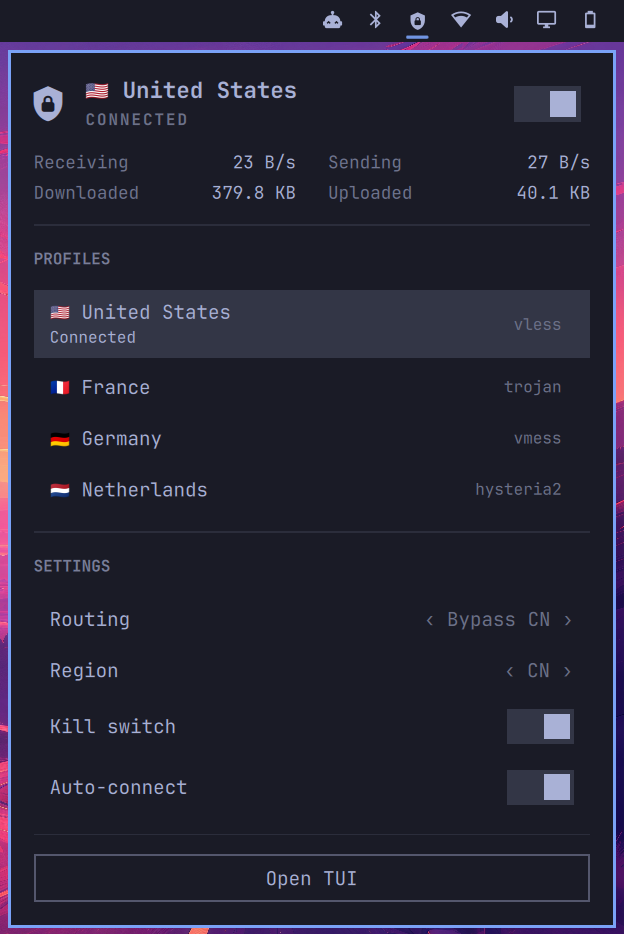
omakvn brings everyday VPN controls to the Omarchy bar — connect and switch profiles, change routing, monitor traffic, and control the kill switch without opening the full TUI.
For VPN setup, profiles, routing, DNS, and other features, see the kvn documentation.
Installation
kvn must be installed first.
Install the full Omarchy integration with:
kvn setup --omarchy
This installs omakvn together with the Apps menu entry, Hyprland shortcuts, and floating-window rules.
To install only the bar plugin:
omarchy plugin add https://github.com/yarikov/omakvn.git --enable
Update
omarchy plugin update yarikov.omakvn
Remove
omarchy plugin remove yarikov.omakvn
Usage
- Left click — open the control panel
- Right click — connect or disconnect
- Middle click — open
kvn
Keybindings
| Key | Action |
|---|---|
j / k, up/down |
Move between controls |
gg / G |
Jump to the first or last control |
Enter / Space |
Activate the selected control |
h / l, left/right |
Change the selected routing mode or region |
s |
Disconnect |
r |
Reconnect |
Shift+A |
Toggle auto-connect |
Shift+K |
Toggle the kill switch |
t |
Open the full TUI |
Tab / Shift+Tab |
Switch between bar panels |
Escape |
Close the panel |
The panel can be used entirely with the keyboard or mouse.
Credits
The original Omarchy integration was contributed by Denis Chupritskiy.