
OmaTips
Master Omarchy keyboard shortcuts with native notifications and Anki-style spaced repetition.
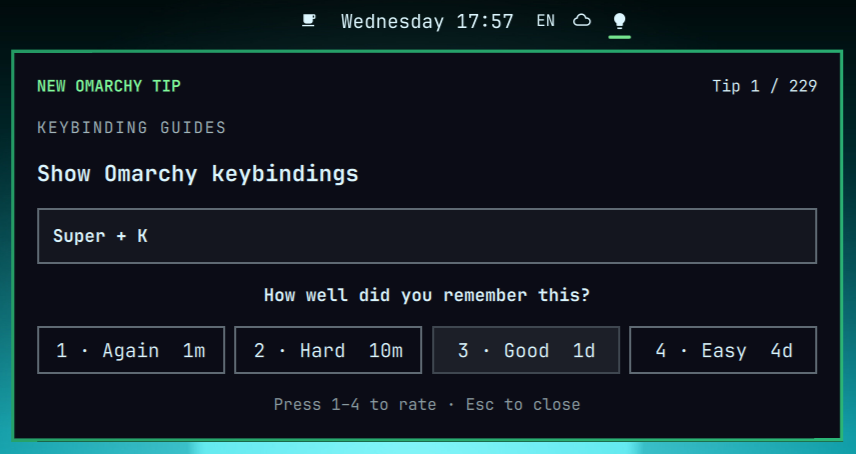
OmaTips is an Omarchy 4 shell plugin with 229 concise tips based on the official Omarchy hotkeys manual. The course covers desktop navigation, window management, applications, capture tools, Tmux, Ghostty, the file manager, Neovim, quick emojis, and XCompose completions.
Rather than presenting a long cheat sheet, OmaTips introduces shortcuts one at a time and brings them back for review until they become muscle memory.
Install
Install and enable OmaTips from GitHub:
omarchy plugin add https://github.com/yarikov/omatips --enable
Plugins run as unsandboxed code inside omarchy-shell; review third-party
plugin code before enabling it.
Use
- Click the lightbulb in the bar to open the current card.
- Use
H/J/K/Lor the arrow keys to select any button, then press Enter to activate it. - Recall the shortcut, then choose Show answer or press Enter/Space to reveal it before grading. Reopening the same card restores its reveal and selected-button state, including after a shell reload, until the card is graded.
- Grade it with
1Again,2Hard,3Good, or4Easy. - Press Escape to close the panel.
- Click the notification to open the same panel, including from notification history.
Due reviews always come before unseen cards. When no review is due, the next new shortcut is available immediately—there is no calendar-day study gate. The bar count includes only studied cards whose review time has arrived; an available new card is shown as a lightbulb without a number.
OmaTips treats 04:00 as the start of a new local study day. Each study day runs from 04:00 through 03:59 the following calendar day. If the queue is not empty, OmaTips may send one reminder between 08:00 and 16:00. It waits for the session to be active and unlocked, but never sends a late reminder after 16:00. For example, if you first start the computer at 17:00, no reminder is sent that day.
Opening the study panel at any time marks the current study day as visited and cancels its reminder. You can still open the panel manually and introduce any number of new cards through the lightbulb. The notification itself is a short study reminder and does not reveal the next card.
Scheduling
Each rating button previews the actual interval that will be assigned to the current card. New cards begin with:
| Rating | Initial interval | Later behavior |
|---|---|---|
| Again | 1m |
Resets the successful-review streak and lowers ease |
| Hard | 10m |
Multiplies the current interval by 1.2 and lowers ease |
| Good | 1d |
Multiplies the current interval by the card's ease factor |
| Easy | 4d |
Multiplies by ease and an additional 1.3 bonus |
Ease starts at 2.5. Successful reviews make intervals grow from the card's
current interval, while difficult or forgotten cards grow more slowly or
return to the initial steps.
Choosing Easy three reviews in a row completes the card permanently, so it no longer appears in the study queue. Any other rating resets this streak.
Button labels stay compact as intervals grow: m is minutes, h is hours,
d is days, mo is 30-day months, and y is 365-day years. A trailing +
means the exact interval contains a smaller remainder—for example, 27d+
may represent 27 days and several additional hours.
When every introduced card is scheduled for later, OmaTips stays out of sight until the next review becomes due.
After the final card is completed, OmaTips keeps its lightbulb in the bar and welcomes you as an Omarchy Hero and Omarchy Hotkey Master. Closing the panel leaves the icon available so the completion screen can be reopened at any time. From there, you can start the course again or uninstall OmaTips. Both actions ask for confirmation because starting again erases the current progress, while uninstalling from the completion screen removes both the plugin and its saved course state.
Privacy and safety
The hotkey course is instructional data: studying a card does not execute its shortcut or modify your bindings. OmaTips does not use the network, request privileges, collect telemetry, or edit system configuration.
Course state is stored at:
${XDG_STATE_HOME:-~/.local/state}/omarchy/omatips/state.json
The file is replaced atomically after each state update. Missing primary state is restored from the most recent valid backup, or starts a new course when no backup exists. Invalid, unsafe, or larger-than-64-KiB state is left untouched; OmaTips disables study-state updates when neither copy can be loaded and reports the error in the shell log.
Develop and verify
From the repository root:
omarchy plugin validate .
qmllint -I /usr/share/omarchy/shell Service.qml BarWidget.qml Panel.qml
QT_QPA_PLATFORM=offscreen QT_QPA_PLATFORMTHEME= /usr/lib/qt6/bin/qmltestrunner -input tests
bash tests/validate_content.sh
bash tests/test_state_read.sh
Changes under ~/.config/omarchy/plugins/ hot-reload. If needed, request a
manual rescan with omarchy-shell shell rescanPlugins.
Remove
omarchy plugin remove yarikov.omatips --yes
rm -f "${XDG_STATE_HOME:-$HOME/.local/state}/omarchy/omatips/state.json"
The first command removes the plugin. The second deletes all saved study progress; omit it if you want a future reinstall to resume the schedule. The completion screen's Uninstall OmaTips button performs both operations.
License
MIT