
OmaNetHub — Omarchy Network Hub
Unified Network, Tailscale, and Firewall management plugin for Omarchy.
Combines Wi-Fi controls, DNS/band management, signal & latency diagnostics, Tailscale peer browsing with Taildrop file sharing, and UFW firewall management — in a single bar widget.
Screenshots
| Network | Tailnet | Firewall |
|---|---|---|
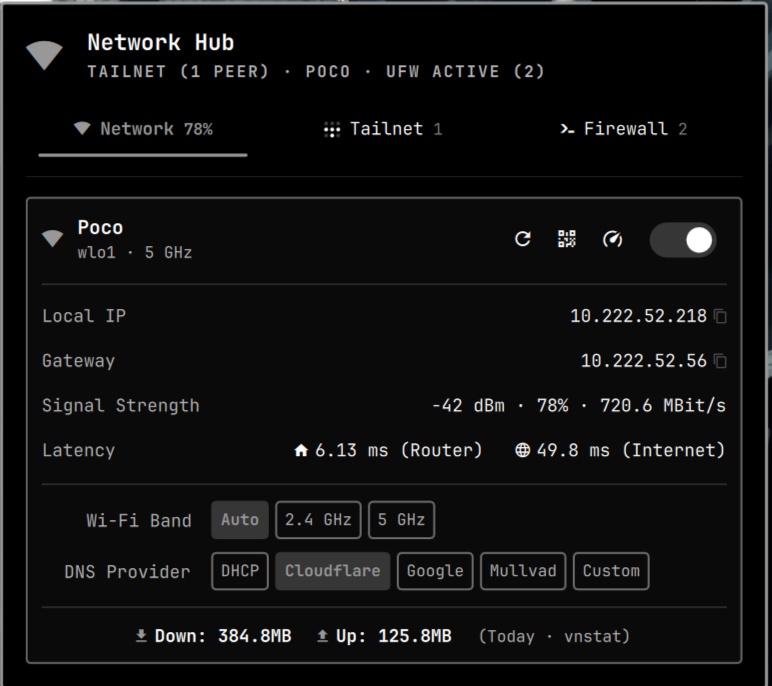 |
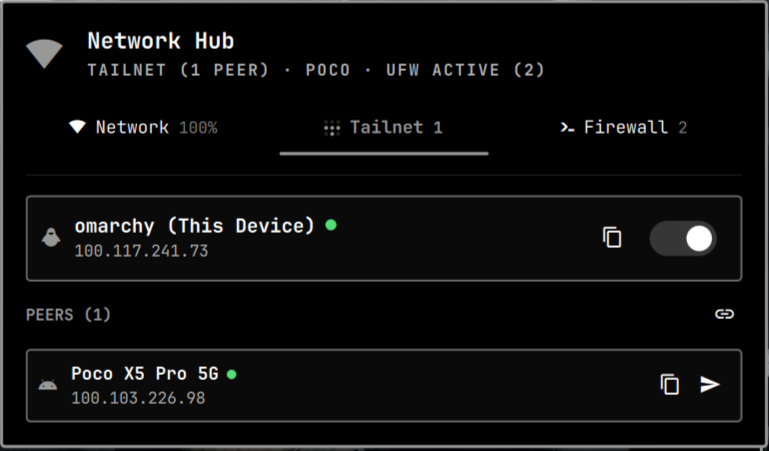 |
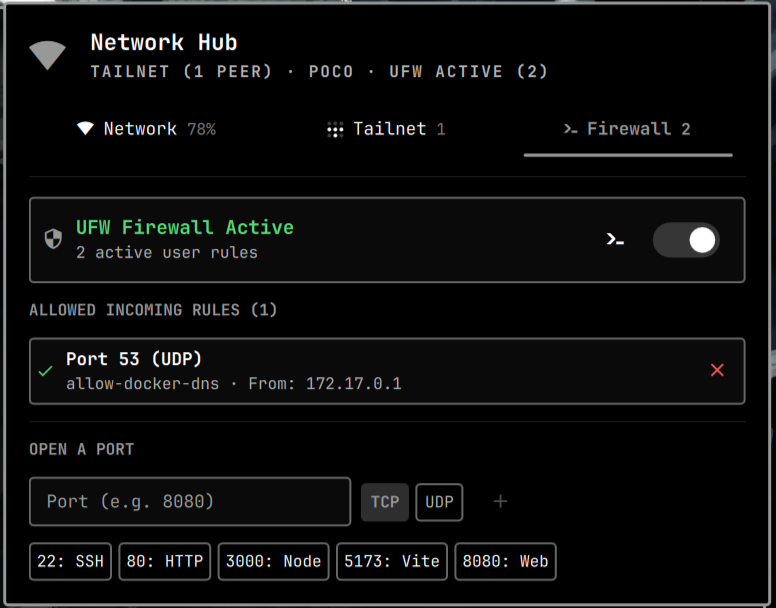 |
Network Tab
Tailnet Tab
Firewall Tab
Features
Network
- Wi-Fi radio toggle, restart, and QR code (via
omarchy.wifiqr) - Wi-Fi discovery when offline: nearby networks with signal, security, and saved-state badges, auto-connect to known networks, inline password entry with error reporting, rescan and disconnect actions
- Connected SSID, interface, frequency/band, signal strength, bitrate, and latency (router + internet ping via
omarchy-network-status) - Local IP / gateway display with one-click copy to clipboard (
wl-copy) - Wi-Fi band steering: Auto / 2.4 GHz / 5 GHz (via
omarchy-network-band) - DNS provider presets: DHCP, Cloudflare, Google, Mullvad, Custom (via
omarchy-dns) - Daily data usage (Down/Up via
vnstator/proc/net/dev) - Speed test summon (via
omarchy.speedtest)
Tailnet (Tailscale)
- Status card for this device: hostname, Tailscale IP, OS icon, online indicator, toggle (
tailscale up/down) - Peer list from
tailscale status --jsonwith OS icons, IP, DNS name, online state - Exit node management: active exit node with one-click disconnect, available exit nodes switchable from peer cards
- Copy actions: IPv4, hostname, or DNS name per peer
- Taildrop file sharing:
- Per-peer send button (opens file picker if no files pre-selected)
- Drag & drop files onto the bar icon or anywhere in the panel
- Auto-send when only one online peer exists, otherwise peer picker
- Admin console shortcut (
https://login.tailscale.com/admin/machines)
Firewall (UFW)
- UFW status card: active/inactive, rule count, enable/disable toggle
- Allowed incoming rules list (parsed from
/etc/ufw/user.rules) with per-rule close action - Open a port: port number + TCP/UDP chip, with quick presets (22, 80, 3000, 5173, 8080)
- View verbose status in floating terminal
Nautilus Integration (Optional)
- Send via Taildrop context menu for GNOME Files (Nautilus). Right-click any file(s) → Send via Taildrop → choose online peer.
- Explicit installation & removal scripts provided in
bin/:- Install:
~/.config/omarchy/plugins/yashwanth.link/bin/install-nautilus-extension - Uninstall:
~/.config/omarchy/plugins/yashwanth.link/bin/uninstall-nautilus-extension
- Install:
Installation
omarchy plugin add https://github.com/yashwk/OmaNetHub.git
The plugin is installed to ~/.config/omarchy/plugins/yashwanth.link/ as a git checkout.
Then enable and place it:
omarchy plugin enable yashwanth.link
omarchy bar move yashwanth.link --section right
# or enable via Omarchy menu → Setup → Plugins
To update later:
omarchy plugin update yashwanth.link
# or update all
omarchy plugin update
Manual install
- Clone to
~/.config/omarchy/plugins/yashwanth.link/:git clone https://github.com/yashwk/OmaNetHub.git ~/.config/omarchy/plugins/yashwanth.link omarchy-shell shell rescanPluginsomarchy plugin enable yashwanth.link
Usage
Bar icon
The widget shows signal/network state ( / / / for wired, when offline) in the bar. Click to open the three-tab panel (Network / Tailnet / Firewall). The tab bar shows badges: signal %, peer count, or UFW rule count.
Drag & Drop (Taildrop)
- Drag file(s) over the bar icon — the panel auto-opens to Tailnet with a drop target.
- Drop files onto a peer row inside the panel to send directly to that peer.
- Drop files onto the panel overlay — if one online peer, sends immediately; if multiple, pick the target device; choose Cancel to abort.
Behind the scenes, sends use tailscale file cp via bin/taildrop-direct-send and bin/taildrop-menu-send (with omarchy-file-select / omarchy-menu-select helpers).
Nautilus Context Menu
To install or remove the "Send via Taildrop" right-click extension in Nautilus:
- Install:
~/.config/omarchy/plugins/yashwanth.link/bin/install-nautilus-extension nautilus -q - Remove:
~/.config/omarchy/plugins/yashwanth.link/bin/uninstall-nautilus-extension
nautilus -q
Requirements
- Omarchy shell (
omarchy-shell/ Quickshell) —omarchy pluginandomarchy-shell shell summonhelpers tailscaleCLI (for Tailnet tab; optional otherwise) —tailscale status --jsonjq(parsingtailscaleJSON instatus.sh)wl-copy(clipboard copy)nmcli/ NetworkManager (network state, optional helpers:omarchy-network-status,omarchy-network-band,omarchy-dns,omarchy-wifiqr,omarchy.speedtest)vnstat(optional, nicer daily usage; falls back to/proc/net/dev)ufw(optional, Firewall tab)xdg-open(admin console link)- GNOME Files +
nautilus-python(optional, for context menu)
All dependencies are soft — tabs degrade gracefully when tools are missing.
Configuration
No extra config required. The widget persists as yashwanth.link in ~/.config/omarchy/shell.json under bar.layout.right once enabled.
To customize position:
omarchy bar move yashwanth.link --section center
License
MIT — see LICENSE