
Omarchy Screen Time
Screen time tracking with hard daily limits for Omarchy v4.
Screen Time shows how many hours your day actually gives to each app. A small widget in your bar keeps today's running total in view, and the dashboard breaks it down by app, by website, and even by terminal command.
Give any of them a daily budget. When Firefox burns through its two hours, a cover appears over Firefox's window only—nothing is killed, and the rest of your desktop stays fully usable. The cover shows the time until reset and a Close app button; switch away and it lifts, refocus and it's back. You pick the numbers; the plugin does the enforcing.
<p align="center"> <img src="screenshots/smallpanel.png" alt="Compact widget" width="330" /> <img src="screenshots/bigpanel.png" alt="Expanded dashboard" width="330" /> </p>What it tracks
- Focus time only. A window sitting behind another window earns nothing.
- Idle time doesn't count either. Counting stops after 60 seconds without input by default, and gaps over five minutes (suspend, crash) count as zero instead of as hours.
- Firefox time splits into sites like youtube.com. Foot or kitty time splits into the commands you ran. Title parsing does this with nothing installed; the optional extension below makes it exact.
- Plumbing apps you never chose to open, like portal wrappers and xwaylandvideobridge, never show up in totals or lists.
- Window titles are thrown away before anything is written to disk. A stored row is an app id, a display name, seconds, and a session count, pruned after 90 days.
Dashboard
Today's total beside yesterday's, the last seven days as clickable bars, and your most-used apps with rings showing what's left of their limits. Step through days with ‹ ›. Colors come from your Omarchy theme, light themes included. There is nothing to configure.
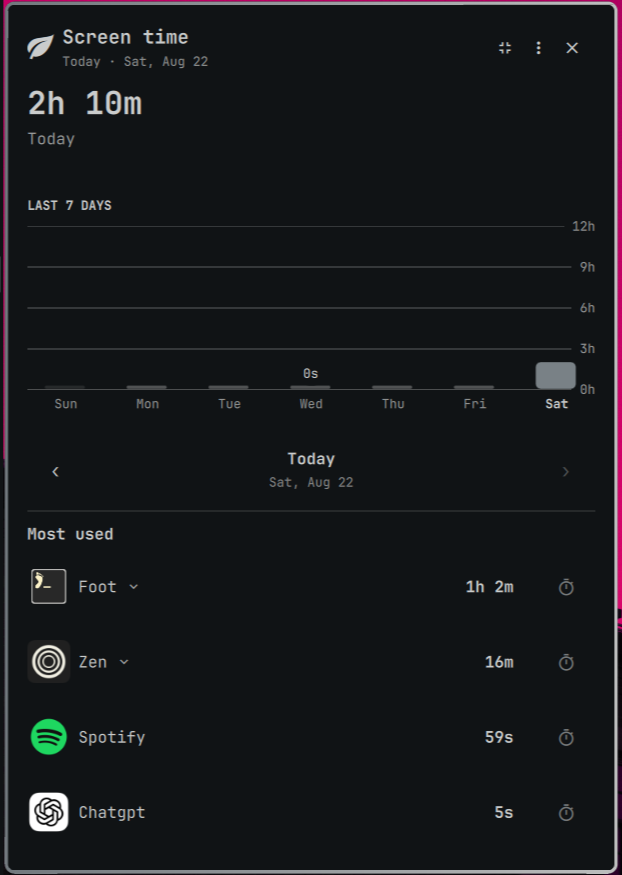
Same panel in other themes:
<p align="center"> <img src="screenshots/othertheme1big.png" alt="Theme 1" width="210" /> <img src="screenshots/othertheme2.png" alt="Theme 2" width="210" /> <img src="screenshots/othertheme3.png" alt="Theme 3" width="210" /> </p>Install
omarchy plugin add https://github.com/yass-gr/omarchy-screen-time.git --enable
Manual clone works too:
git clone https://github.com/yass-gr/omarchy-screen-time.git ~/.config/omarchy/plugins/yass-gr.screen-time
omarchy-shell shell rescanPlugins && omarchy plugin enable yass-gr.screen-time
Enabling starts the tracker inside your running omarchy-shell process, so there is no second Quickshell instance eating RAM. The widget lands on the right side of the bar. Move it with omarchy bar move yass-gr.screen-time --section left|center|right, click it to open the dashboard.
Requires Omarchy 4.
That's the whole install. Optional extra: exact per-site browser tracking needs a tiny companion extension — see Exact site time below.
Limits
Set a timer from any row's ring, from the overflow menu, or from a terminal:
omarchy-shell screen-time setLimit firefox 2700        # 45 minutes a day
omarchy-shell screen-time setRuleEnabled firefox false # pause without deleting
omarchy-shell screen-time deleteLimit firefox          # remove entirely
Limits run from 60 seconds to 24 hours. When one runs out you get a single notification for the day, and the app's window gets covered until midnight—the rest of the screen stays clickable and compositor keybinds keep working. Disabling or deleting the rule unblocks the app immediately. Deleting history leaves rules alone; deleting rules leaves history alone.
Keyboard
The dashboard works without a mouse. Hovering and arrow keys move the same cursor.
| Key | Action |
|---|---|
| ↑ ↓ | Move between apps; collapse from compact view |
| Enter | Expand dashboard, expand group, or open the timer editor |
| ← → | Previous or next day |
| n / e | New timer; edit focused timer |
| Delete | Remove focused timer |
| o | Overflow menu |
| / | Jump to first row |
| Esc | Back out |
In the timer editor, ← → pick the hour/minute/second drum and ↑ ↓ spin it. Tab reaches the buttons.
Exact site time (optional)
Without the extension, sites come from window titles, which sometimes guess wrong. The companion WebExtension reports the real host:
bash ~/.config/omarchy/plugins/yass-gr.screen-time/browser-extension/install.sh
Load browser-extension/firefox/manifest.json through about:debugging in Firefox or Zen, or load the browser-extension/chrome/ folder unpacked through chrome://extensions in Chrome or Brave. The extension sends exactly one string, the bare hostname, to a bridge listening on 127.0.0.1:8765. No URLs and no page contents ever leave the browser, and the bridge rejects requests that lack the token generated at install time.
Scripting
omarchy-shell screen-time status    # loaded, today's total, idle state, exhausted apps
omarchy-shell screen-time today     # per-app list with remaining time
omarchy-shell screen-time week      # last seven days
omarchy-shell screen-time clearHistory yes
Usage lives in ~/.local/state/omarchy-screen-time/usage.json, kept for 90 days. Settings and rules live in ~/.config/omarchy/screen-time.json.
Development
node tests/run-tests.mjs      # unit tests for the pure JS core
omarchy plugin validate .     # manifest check
qmllint -I /usr/share/omarchy/shell *.qml
AGENTS.md documents the dev loop, including a symlink quirk that will otherwise cost you an hour of rescan-and-pray.
Removal
omarchy plugin remove yass-gr.screen-time
rm -f ~/.config/omarchy/screen-time.json
rm -rf ~/.local/state/omarchy-screen-time
Removing the plugin stops tracking immediately. The files above are data only; delete them whenever you like.
License
MIT, see LICENSE. An independent community plugin, not affiliated with the Omarchy project.