
OmaFob
Two-factor codes in the Omarchy bar. Import every account from Google Authenticator in one scan.
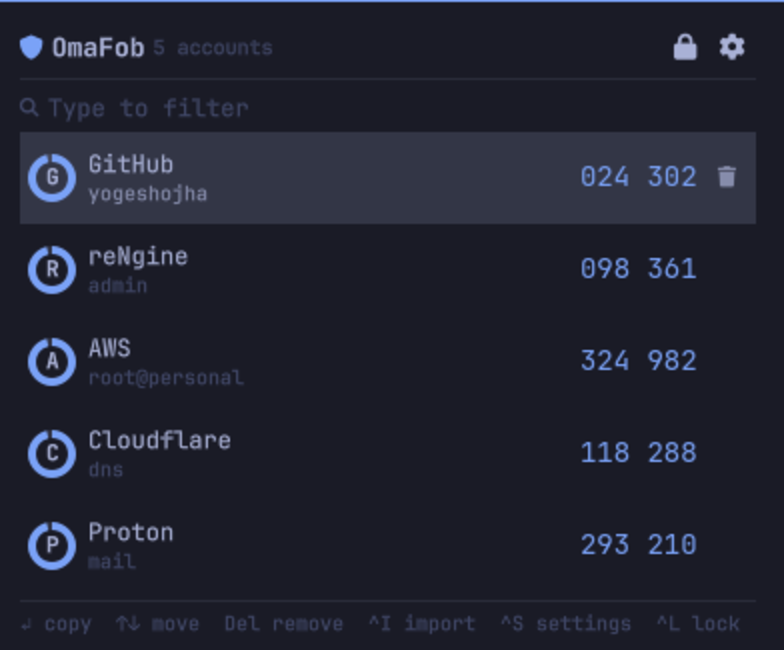
Not a login guard for Omarchy. It replaces the authenticator app on your phone. Omarchy only.
Keybind, type gh, Enter. The code is on your clipboard, wiped 30 seconds
later.
Why
When I am doing research work I keep my phone out of the room. It sits in the bedroom, and every code meant getting up to fetch it. So I built this.
Install
omarchy plugin add https://github.com/yogeshojha/omafob.git --enable
sudo pacman -S --needed gnupg wl-clipboard zbar grim slurp
Keybind, in ~/.config/hypr/bindings.conf:
bindd = SUPER SHIFT, O, OmaFob, exec, omarchy-shell yogeshojha.omafob toggle
Import
Google Authenticator: ⋮ → Transfer accounts → Export accounts. One QR holds
every account you pick.
- Camera:
Ctrl+W, hold the phone up to the webcam. - Screen:
Ctrl+I, drag a box over the QR. - Paste: an
otpauth://link, or a path to a QR image.
Re-importing the same export is safe. Accounts already stored are skipped.
Keys
| Key | |
|---|---|
| any letter | filter the list |
Enter |
copy the selected code |
↑ ↓ |
move |
Backspace / Ctrl+U |
edit or clear the filter |
Del |
remove an account |
Ctrl+I |
scan the screen |
Ctrl+W |
scan from the camera |
Ctrl+S |
settings |
Ctrl+L |
lock |
Esc |
clear the filter, then close |
Letters go to the filter.
Settings
Ctrl+S, or Setup > Plugins.
| Privacy mode | codes stay masked in the panel, default off |
| Countdown ring | ring around the bar icon, default off |
| Clear clipboard after | default 30 seconds |
| Auto-lock vault | default off |
| Group digits | 418 293 instead of 418293 |
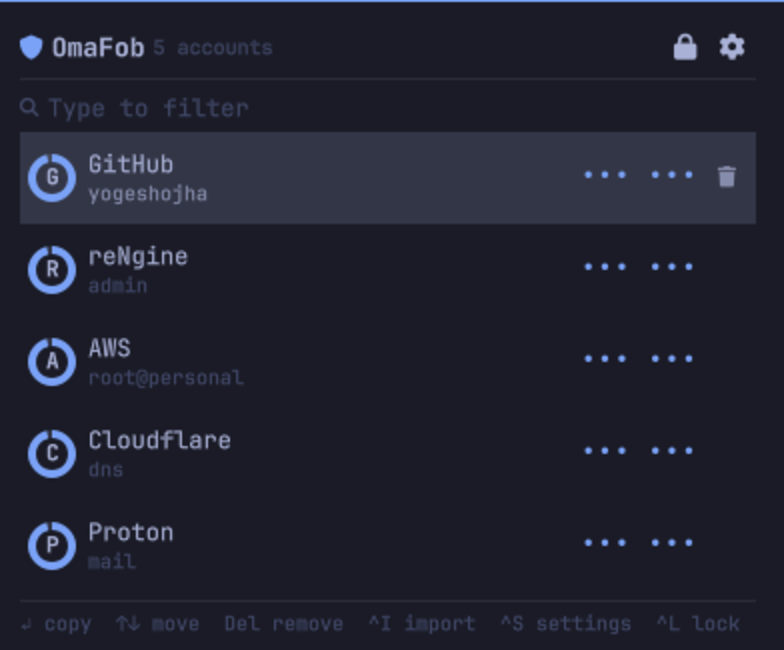
Privacy mode shows every account as ••• ••• and never reveals a code. Enter
still copies. For screen sharing and open offices.
Security
- Vault:
gpg --symmetric, AES-256, SHA-512, at~/.local/share/omafob/vault.gpg, mode0600in a0700directory. - The passphrase reaches gpg on its own fd, never
argv.--no-symkey-cache. - The helper holds the secrets. The shell receives codes and expiry times.
- Copies use
wl-copy --sensitive. Codes stay out of clipboard history. - QR images are never written to disk.
grimpipes intozbar, the camera is decoded inside the helper. There is no camera preview. - Children carry
PR_SET_PDEATHSIG. A killed helper releases the camera. - Deleting an account deletes
vault.gpg.previouswith it.
Plugins run unsandboxed inside omarchy-shell, and the helper runs as you.
While the vault is unlocked, anything running as your user can ask it for
codes. The encryption covers the vault at rest.
HOTP
Counter-based accounts import and show a COUNTER tag. Codes for them are not
generated yet.
Command line
ln -s ~/.config/omarchy/plugins/yogeshojha.omafob/omafob ~/.local/bin/omafob
omafob status                   # where the vault is
omafob list                     # stored accounts
omafob code github              # one code
omafob scan                     # import from the screen
omafob camera                   # import from the webcam
omafob add <link-or-image>      # import a link or QR image
omafob remove github            # delete an account
omafob passwd                   # change the passphrase
--vault <path> for a vault elsewhere.
Development
python3 test/test_twofa.py
python3 test/test_security.py
ruff check .
qmllint -I /usr/share/omarchy/shell *.qml
omarchy plugin validate .
Panel.qml holds the views and the keyboard model, BarSlot.qml the bar item,
AccountRow.qml a row, VaultController.qml the helper process and the
countdown, Model.js the pure helpers, twofa/ the helper.
The helper speaks line-delimited JSON on stdin. Each request carries a seq
that comes back on the reply. Account ids go in id.
Saving under ~/.config/omarchy/plugins/ reloads the shell and re-locks the
vault. A QML compile error is cached; run omarchy-restart-shell after fixing
one.
Remove
omarchy plugin remove yogeshojha.omafob
The vault stays. rm -rf ~/.local/share/omafob removes it too.
MIT