
Unified Remote Servers
An Omarchy Quattro bar plugin for SSH servers. Keep a list of hosts, poll Linux CPU and RAM over SSH, and open a terminal that connects with ssh.
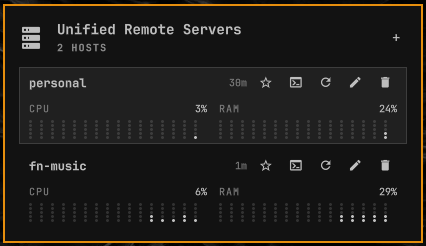
Keys must already be on the server. This plugin never prompts for a password, never copies keys, never starts a second Quickshell process, and never requests sudo.
Install
omarchy plugin add https://github.com/yooneskh/unified-remote-servers.git --enable
Place it with:
omarchy bar move yooneskh.unified-remote-servers --section right
Usage
- Left click the bar icon to open or close the panel
- Middle click the bar icon to refresh every server
- In the panel:
j/kmove, Enter connects,aadd,eedit,dorxdelete,ror the row refresh button polls that host, Escape closes
Each host has its own poll interval: 5 minutes, 30 minutes, 1 hour, or a custom number of seconds.
Requirements
- Omarchy Quattro with third-party shell plugins
sshonPATH- Remote hosts must be Linux with
/proc/statand/proc/meminfo - Passwordless public-key SSH already working (
BatchMode). Unknown hosts must already be inknown_hosts
The plugin runs inside omarchy-shell as your user. It periodically runs ssh to hosts you add, using a 1-second remote sample of CPU and RAM. It does not install packages, daemons, or keys.
Remove
omarchy plugin remove yooneskh.unified-remote-servers
Removal disables and deletes the plugin checkout. Your server list stays at ~/.local/state/omarchy/unified-remote-servers/servers.json.