
Rig
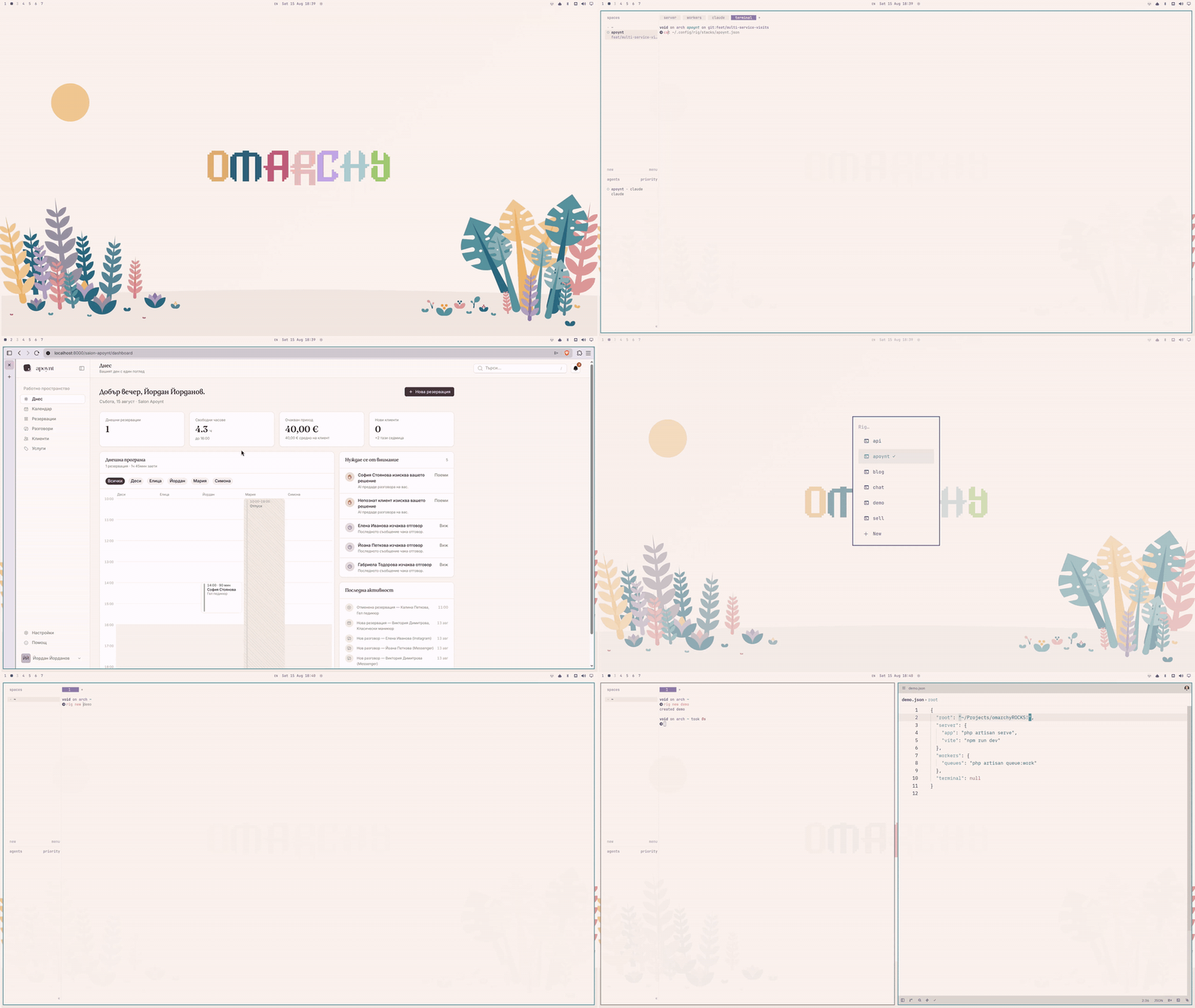
Project stacks for Herdr. rig acme — and the whole workspace is up.
You know the ritual. Open a terminal. Start the server. Split a pane, boot Vite. New tab for the queue worker, another for the scheduler, one more to actually work in. A couple of minutes of muscle memory before you've written a single line of code — every single morning.
Rig ends the ritual. Describe your project's stack once, in one small JSON file:
{
  "root": "~/Projects/acme",
  "server": {
    "artisan": "php artisan serve",
    "vite": "npm run dev"
  },
  "workers": {
    "queues": "php artisan queue:work",
    "scheduler": "php artisan schedule:work",
    "reverb": "php artisan reverb:start"
  },
  "claude": "claude",
  "terminal": null
}
Then bring it up whenever you need it. Rig builds the whole workspace in Herdr — tabs, evenly split panes, every process running, dependent panes waiting for their upstreams:
acme
├─ server     [ artisan ]  [ vite ]
├─ workers    [ queues ]  [ scheduler ]  [ reverb ]
├─ claude     [ claude ]
└─ terminal   [ shell ]              you land here, ready to work
The rules fit in your head: top-level keys are tabs, nested objects are
panes, a string is a command, null is an empty terminal. That's the whole
format. No daemon, no YAML, no dependencies — just a small plugin living in
your Omarchy shell.
Installation
Rig needs Omarchy 4 or newer — Herdr ships with it.
omarchy plugin add https://github.com/yordanbuilds/rig.git --enable
On first load:
- Rig appears in the Omarchy menu, under Trigger
- the
rigcommand lands on your PATH - Rig asks about the <kbd>SUPER</kbd>+<kbd>R</kbd> shortcut — decline, and
Add SUPER+R shortcut waits in the menu (or
rig bind-key)
Prefer another key? Write it yourself in ~/.config/hypr/bindings.lua:
o.bind("SUPER + SHIFT + R", "Rig", "omarchy-shell shell toggle omarchy.menu '{\"menu\":\"trigger.rig\"}'")
Everything Rig adds is marked and yours.
Updating? omarchy plugin update yordanbuilds.rig.
Leaving? rig uninstall removes it all and asks about your stack files.
Usage
The menu
Your stacks are entries in the Omarchy menu, under Trigger.
| In the menu | What happens |
|---|---|
| <kbd>SUPER</kbd>+<kbd>R</kbd> | Open your stacks in the menu |
| type | Search |
| <kbd>Enter</kbd> | Bring the stack up (opening Herdr if needed) — or jump to it |
| ✓ | This stack is running |
+ New |
Name a stack, get a working template in your editor |
Add SUPER+R shortcut |
Bind the key — only while no shortcut exists |
Because stacks are ordinary menu entries, they are searchable from the Omarchy menu itself: open it anywhere, type the project's name, and press <kbd>Enter</kbd>.
The CLI
Everything the menu does is also a command:
rig                           open the stack menu
rig acme                      build acme — or jump to it, if running
rig up acme -b                build in the background
rig kill acme                 close its workspace
rig new widgets --from acme   clone a stack definition into your editor
rig list                      JSON status of every stack, for scripting
rig sync                      put hand-dropped stack files on the menu
rig bind-key                  bind SUPER+R to the stack menu
Commands are safe to repeat — rig acme on a running stack doesn't
build a second one, it takes you there. The CLI waits and reports the
outcome in the terminal; menu-launched actions report through
notifications instead.
Stack files
One file per stack in ~/.config/rig/stacks/ — the filename is the stack
name. root sets the working directory for every tab and is the only
required key. Every other key is a tab, created in file order:
| A tab like | Opens |
|---|---|
"server": "command" |
One pane, running the command |
"terminal": null |
One empty terminal |
"workers": { … } |
One pane per entry, split evenly |
After a build, focus lands on the last tab in the file — end with
"terminal": null to start in an empty shell.
Waiting on other panes
Some panes shouldn't start until something else is ready. Declare that with the long pane form:
{
  "root": "~/Projects/widgets",
  "server": {
    "sail": "./vendor/bin/sail up -d",
    "vite": {
      "run": "./vendor/bin/sail npm run build",
      "after": "sail"
    },
    "tunnel": {
      "run": "cloudflared tunnel run widgets-dev",
      "after": "vite"
    }
  },
  "workers": {
    "queues": {
      "run": "./vendor/bin/sail artisan queue:work",
      "after": "sail"
    },
    "scheduler": {
      "run": "./vendor/bin/sail artisan schedule:work",
      "after": "sail"
    }
  },
  "terminal": null
}
| Key | Meaning |
|---|---|
run |
The command |
after |
Wait for the named pane — anywhere in the stack — to become ready |
ready |
Optional: text in the output that marks the pane ready |
A pane counts as ready at the first of:
- its command finishes —
sailis ready once the containers are up - it starts listening — a dev server is ready the moment it binds its port
- its
readytext appears — for anything that neither exits nor listens - two minutes pass — the gate times out and the pane starts anyway
If a pane's command fails before becoming ready, panes waiting on it hold and say so — fix it, run it again, and they release.
For a process that neither exits nor listens, declare what ready looks like — panes waiting on it start as soon as that text appears in its output:
"stripe": {
  "run": "stripe listen --forward-to localhost:8000",
  "ready": "Ready!"
}
The wait happens inside the dependent pane, where you can watch it.
License
Rig is open-source software licensed under the MIT license.