
YouTube Control Center
YouTube and YouTube Music finally behave like two real desktop players—not two tabs fighting over the same controls.
What makes it different
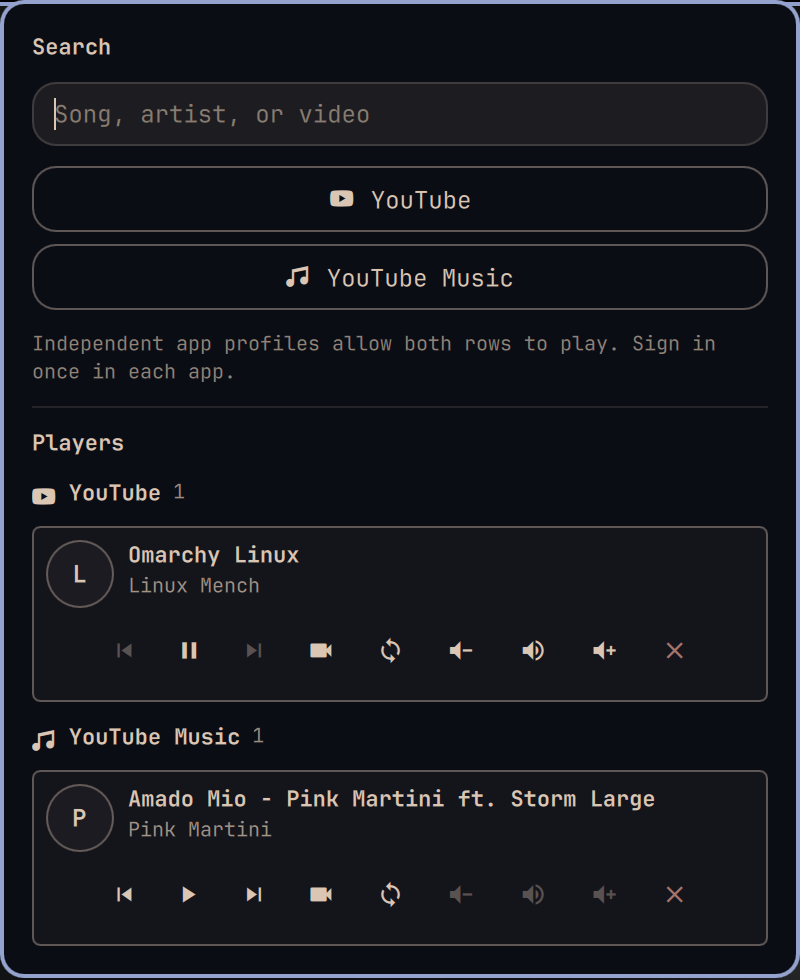
- Keep both worlds separate. YouTube and YouTube Music get independent app profiles and independent player rows. A paused video never disappears just because music started.
- Hand off instead of hunting tabs. One button starts the player you want and pauses every other player, so switching from a video to music never creates overlapping audio.
- Change the player, not the whole desktop. Volume and mute controls target the exact YouTube or Music stream while system volume stays untouched.
- Jump straight to the right window. Bring a player's video to the front—or close only that player—without guessing which Chromium window owns the sound.
- Search where you mean to listen. Type once, then send the query directly to YouTube or YouTube Music. Each service remembers its own sign-in after the first launch.
- See every session at once. Multiple active players remain visible and controllable from one compact Omarchy bar popup.
Use it
Open the YouTube icon in the Omarchy bar. Search for a song, artist, or video, then choose YouTube or YouTube Music. Every active session gets its own transport, window, handoff, volume, mute, and close controls.
The circular-arrows button is the shortcut that changes the experience: it plays that row and pauses the others.
Install
omarchy plugin add https://github.com/janooh37-hue/omarchy-youtube-control-center.git
omarchy plugin enable youtube.control-center
The plugin replaces Omarchy's built-in media widget while installed. Removing it restores the built-in widget.
Remove
omarchy plugin remove youtube.control-center
The plugin stores its two Chromium profiles under ${XDG_DATA_HOME:-~/.local/share}/youtube-control-center/. Removing the plugin does not delete those profiles, so browser sign-ins are never erased without your explicit action.
Requirements and permissions
- Omarchy Quattro with the Omarchy shell
- Chromium at
/usr/bin/chromium - PipeWire for exact per-player volume and mute controls
- Hyprland and
uwsm-app, included with Omarchy
No YouTube API key is required. The plugin launches local Chromium app windows, reads their standard MPRIS playback state, matches their PipeWire streams, and uses Hyprland to focus or close the chosen window. It runs entirely without elevated privileges and does not install packages or overwrite user configuration.
License
MIT — see LICENSE.